

Overview
The Aikido Security integration syncs vulnerability and repository scanning data into Comp AI, so compliance tasks can be automatically satisfied with continuous evidence.What Comp AI Collects
Secure Code evidence
- Open security issues (by severity)
- Repository scanning activity
- Stale scans (repos not scanned in over 7 days)
Monitoring and Alerting evidence
- Issue count thresholds (configurable)
- Severity breakdown summaries
Configuration Options
After connecting, you can configure:- Minimum severity to fail on (low, medium, high, critical)
- Maximum allowed open issues (threshold check)
- Repositories to monitor (optional filter)
- Include snoozed issues (optional)
Verify It Works
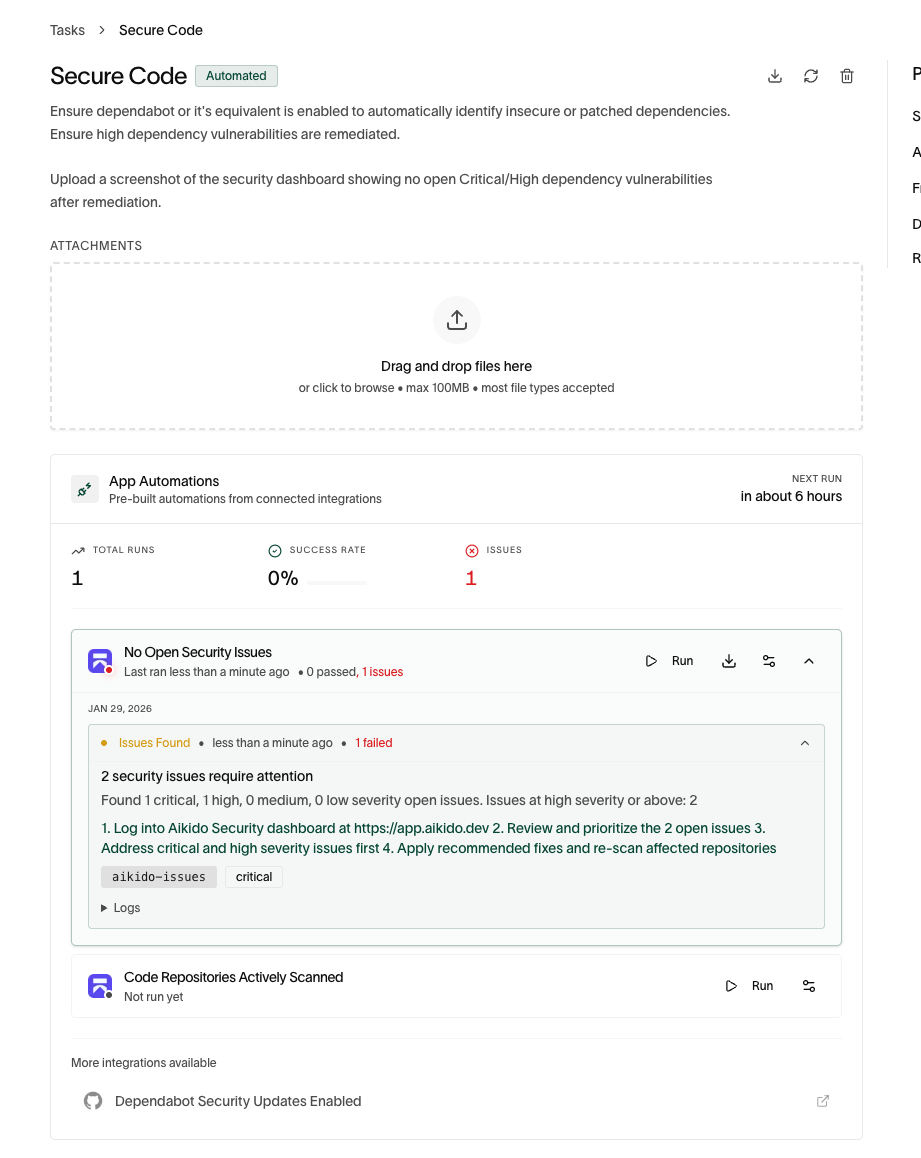
Checks run on their own, and the manual re-run lives on the task the check feeds — not on the integration page.- Open the Aikido integration in Comp AI and find the Evidence tasks section
- Click Open on one of those tasks
- In the task’s App Automations card, click Run on an Aikido check
- The check expands to show the run and the passing or failing evidence it collected
HTTP 401: Unauthorized, verify the Client ID and Client Secret and ensure the required permissions are enabled in Aikido.
References
- Aikido API docs: https://apidocs.aikido.dev/reference