CCPA Compliance Requirements: Complete Guide (2025)
Complete CCPA compliance guide for B2B SaaS: consumer rights handling, opt-out infrastructure, vendor contracts, and defensible documentation.
If you're searching for CCPA compliance requirements, you're probably facing one of these situations: your company just hit California revenue thresholds, an enterprise buyer asked for privacy documentation, or you're trying to avoid enforcement risk while scaling. Either way, you need clarity on what CCPA actually requires and how to implement it without derailing your roadmap.
CCPA compliance isn't just about posting a privacy policy (though many companies treat it that way). It's a complete operating model involving consumer rights workflows, vendor contracts, opt-out infrastructure, and proof systems that regulators expect when they come knocking.
Does CCPA Apply to Your B2B SaaS Company?
Most B2B SaaS companies underestimate their CCPA exposure. If you process any California residents' data (employees, freemium users, website visitors, prospects), you're potentially in scope.
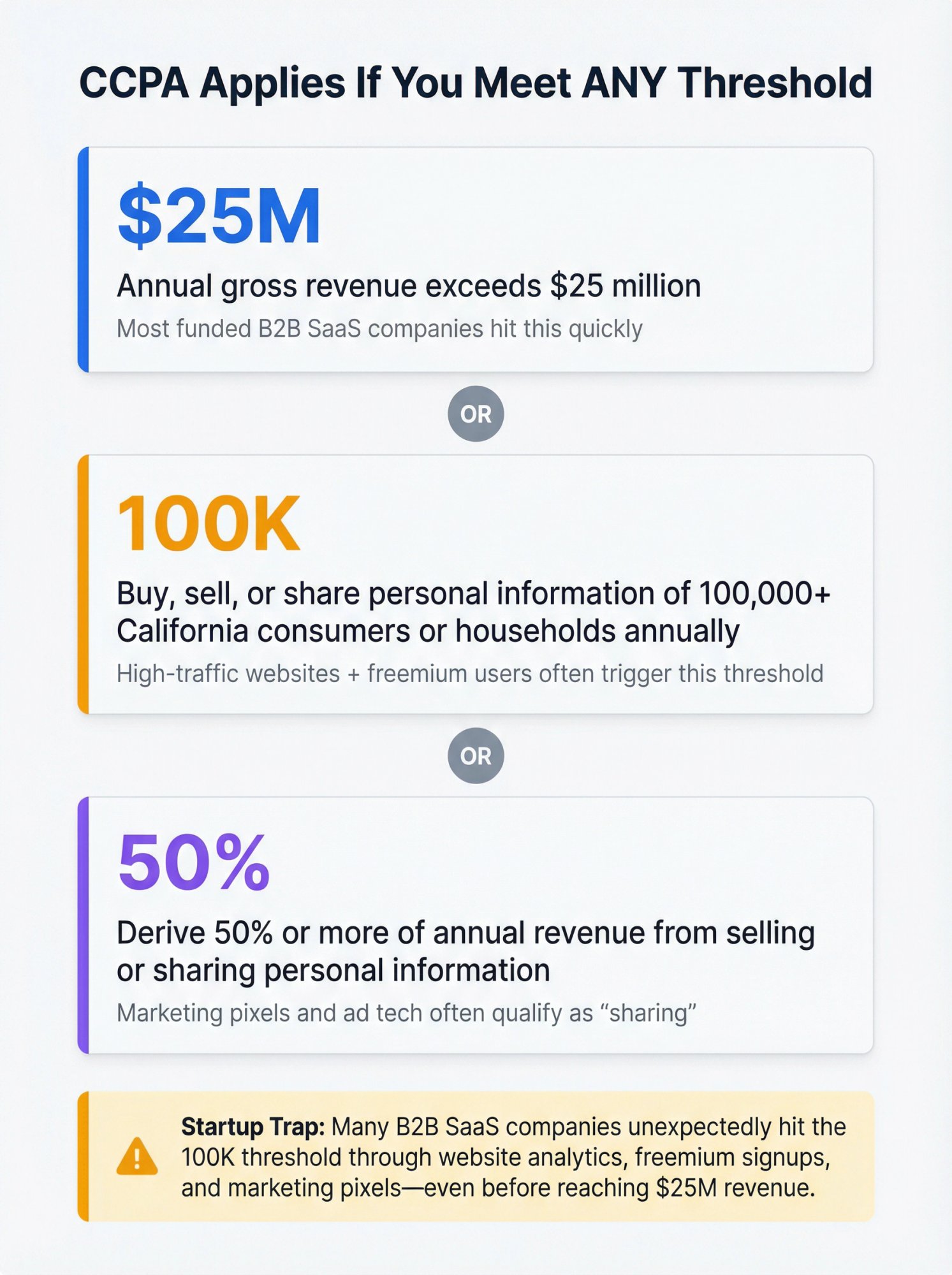
You're subject to CCPA if you meet any of these thresholds:
→ Annual revenue exceeds $25 million
→ You buy, sell, or share personal information of 100,000+ California consumers or households annually
→ You derive 50% or more of annual revenue from selling or sharing personal information
That second threshold trips up startups faster than you think. A high-traffic website plus freemium signups can put you over 100,000 California residents quickly, especially if you're tracking analytics and marketing pixels.
What "Sell or Share" Actually Means Under CCPA
Here's where it gets tricky. You might think "we don't sell data" because you're not literally selling a database. But CCPA defines "sell" and "share" broadly enough that your marketing pixels probably qualify.
⚠️ CRITICAL COMPLIANCE INSIGHT: If you use retargeting pixels, cross-context behavioral advertising, or third-party cookies that enable cross-site profiles, you're likely "sharing" personal information under California law. That triggers mandatory opt-out mechanisms and Global Privacy Control requirements.
This catches companies off guard during their first compliance review.
6 CCPA Compliance Systems Every Company Must Build
Think of CCPA compliance as interconnected systems rather than a checklist. Each one needs to work reliably or the whole program falls apart.

1. How to Build CCPA-Compliant Privacy Notices
Your privacy disclosures need to reflect actual data flows, not aspirational ones. Regulators look for mismatches between what you say and what you actually do.
Notice at collection requirements:
You must disclose key information at or before collecting personal information. For B2B SaaS, that typically means:
- Signup and onboarding forms
- "Contact sales" and demo request forms
- Newsletter signups and chat widgets
- Application telemetry collection points
The notice should be short and user-readable, linking to your full privacy policy for details.
Privacy policy must cover:
| Required Element | What This Means for SaaS |
|---|---|
| Categories of PI collected | Email, IP addresses, usage data, support tickets, etc. |
| Sources of PI | Direct collection, third-party tools, integrations |
| Business purposes | Product delivery, support, analytics, marketing |
| Third-party disclosures | Who you share data with and why |
| Consumer rights | How to request access, deletion, correction, opt-out |
| Retention criteria | How long you keep data (or how you decide) |
Most startups write a pretty policy that's wrong rather than a plain one that's accurate. Build your data inventory first, then write the policy to match it.
2. How to Handle CCPA Consumer Rights Requests (DSARs)
Under CCPA, California residents have rights your company must support reliably and within strict timelines. Missing these deadlines creates easy enforcement exposure.
Rights you must handle:
- Right to know/access (categories and specific pieces of personal information)
- Right to delete (with proper verification and limited exceptions)
- Right to correct (inaccurate personal information)
- Right to opt out of sale/share (if applicable to your processing)
- Right to limit use of sensitive personal information (if you use SPI beyond permitted purposes)
- Right to non-discrimination (can't penalize people for exercising rights)
Your DSAR program needs:
Intake channels: Web form (recommended primary method), dedicated email address, and possibly toll-free number depending on your customer base
Verification procedures: Document what identity proof you require for each request type. Don't over-collect (creating new privacy risk) but verify enough to protect consumers.
Routing logic: Triage requests by type and route to the right data system owners (product database, CRM, support tools, data warehouse, billing system)
Fulfillment workflows: Standard operating procedures for each request type with clear timelines and escalation paths
Treat CCPA timelines as first-class SLAs. Missed deadlines are an easy enforcement wedge for regulators.
3. How to Implement CCPA Opt-Out Requirements (Do Not Sell)
If your processing qualifies as "sale" or "share," you need a working opt-out mechanism. Many companies discover this requirement through their marketing stack rather than intentional design.
Actionable test for B2B SaaS:
If you run ad pixels that enable cross-site targeting or share data with partners for cross-context behavioral advertising, assume you're "sharing" until you've mapped the data flows and confirmed otherwise.
Global Privacy Control (GPC) matters in 2025:
Regulators emphasize honoring opt-out preference signals. Your implementation checklist should include:
- Detect GPC signal at browser/device level
- Treat as valid opt-out of sale/share where applicable
- Persist preference and apply consistently
- Ensure vendors stop receiving data that constitutes sale/share after opt-out
If you collect sensitive personal information (precise geolocation, financial data, biometrics, health data, sexual orientation, etc.) and use it beyond permitted purposes, you need a separate "Limit the Use of My Sensitive Personal Information" mechanism.
4. CCPA Vendor Contract Requirements That Actually Work
CCPA compliance lives or dies on vendor control. The type of relationship (service provider vs. third party) changes your obligations significantly.
Create an internal vendor taxonomy:
For each vendor, label them as:
- Service provider/contractor (restricted use, acting on your behalf, requires specific contract terms)
- Third party (more independent use, may trigger sale/share analysis)
Your vendor templates need:
Most startups have 30-150 SaaS tools in their stack. You don't need to renegotiate everything immediately. Prioritize vendors processing the highest-risk data first:
→ Support and ticketing systems (contain customer conversations and issues)
→ Authentication and identity providers (control access to everything)
→ Payment processors and billing systems (financial data)
→ Analytics and advertising tools (often trigger sale/share questions)
Your Data Processing Agreement should cover permitted purposes, usage restrictions, consumer request assistance obligations, security requirements, and subprocessor controls.
For a deeper dive into vendor risk assessment frameworks, explore our guide on third-party vendor risk management.
5. CCPA Data Retention Requirements and Deletion Schedules
CPRA-era expectations push companies toward not keeping personal data forever. You need documented retention decisions tied to disclosed purposes.
Operational deliverable:
A retention schedule mapping: data category → system → owner → retention period/criteria → deletion method
Most B2B SaaS companies can start with simple retention tiers:
| Data Category | Retention Period | Deletion Method |
|---|---|---|
| Active customer data | Duration of relationship + legal hold period | Hard delete + deidentification where needed |
| Former customer data | 1-3 years for support/warranty | Hard delete after retention expires |
| Prospect/lead data | 2 years if no engagement | Delete or anonymize |
| Application logs | 90 days to 1 year | Automated purge |
| Support tickets | 3 years for quality/training | Archive then delete |
The key is documenting the logic and having a mechanism to actually execute deletions. Our provides practical templates for implementing these schedules.
6. CCPA Security Requirements for B2B SaaS Companies
CCPA isn't only a privacy notice law. Weak security is where companies get enforcement action and breach exposure simultaneously.
For B2B SaaS under 100 employees, "reasonable security" typically means:
Access controls:
- MFA everywhere (SSO for workforce where possible)
- Least-privilege access with periodic reviews
- Onboarding/offboarding automation
Implementing robust access control policies is essential for CCPA compliance and overall security posture.
Data protection:
- Encryption in transit (TLS) and at rest for databases containing PI
- Proper key management
- Secure backup procedures
Vulnerability management:
- Regular scanning of infrastructure and applications
- Patch SLAs (critical vulnerabilities within days, not weeks)
- Dependency monitoring for third-party libraries
Incident response:
- Documented plan tested at least annually
- Clear escalation paths and notification procedures
- Post-incident review process
A comprehensive incident response policy ensures you're prepared for privacy breaches and other security events.
These security controls overlap strongly with SOC 2 and ISO 27001 requirements, which is good. If you're building CCPA compliance, you're laying groundwork for security certifications that enterprise buyers increasingly require.
Complete CCPA Documentation Checklist for Audits
When an enterprise buyer requests privacy documentation or a regulator opens an inquiry, you need these artifacts ready:

Public-Facing
- Privacy Policy (CCPA/CPRA compliant with all required disclosures)
- Notice at Collection (website and in-product where appropriate)
- "Do Not Sell or Share My Personal Information" mechanism (if applicable)
- "Limit the Use of My Sensitive Personal Information" mechanism (if applicable)
- Cookie consent/preferences center (often required to operationalize choices)
Internal Program
Documentation you need ready:
- Data inventory/data map showing systems, PI categories, purposes, and sharing relationships
- Vendor register with proper classification (service provider/contractor/third party)
- DSAR standard operating procedure covering intake, verification, fulfillment, response, logging
- Identity verification policy with risk-based thresholds
- Retention schedule with deletion procedures
- Training records documenting who was trained on privacy requirements
- Incident response plan (supports both privacy and security requirements)
How to Build a CCPA DSAR Workflow (Startup-Friendly)
Here's a workflow that's defensible without requiring a full privacy team:
Step 0: Define Request Types
Create standard categories:
- Know/access (categories or specific pieces)
- Delete
- Correct
- Opt-out of sale/share
- Limit sensitive PI
- Authorized agent requests

Step 1: Intake
Minimum recommended setup:
- Web form at
/privacy-requestor similar
- Email alias like
privacy@yourcompany.com
- Integration with ticketing system (Jira/Linear/Zendesk) so nothing gets lost
Step 2: Identity Verification (Risk-Based Tiers)
Different request types require different verification levels. Here's a practical framework:
| Verification Tier | Request Type | Verification Method |
|---|---|---|
| Tier A: Low risk | Opt-out of sale/share | No deep identity proof required (honoring a preference) |
| Tier B: Medium risk | Know categories, basic deletion | Account login or email confirmation |
| Tier C: High risk | Specific pieces of PI, portability | Authenticated session + step-up check |
Avoid requesting highly sensitive documents unless clearly necessary for verification.
Step 3: Data Discovery
Query systems by identifier (email, user ID, etc.):
Core systems to search:
- Application database (user table, activity logs)
- Authentication provider (Okta, Auth0, Google Workspace)
- CRM (HubSpot, Salesforce, Pipedrive)
- Billing system (Stripe, Chargebee)
- Support tools (Zendesk, Intercom, Help Scout)
- Data warehouse (BigQuery, Snowflake, Redshift)
- Email platforms (Customer.io, SendGrid, Mailchimp)
- Logging/monitoring where PI exists (logs often contain IP addresses and user identifiers)
Step 4: Fulfillment by Request Type
Know/access:
Provide the requested disclosure scope (categories and/or specific pieces per request type). Include contextual details: sources, purposes, third-party categories.
Delete:
Delete from primary systems unless an exception applies (legal hold, fraud prevention, etc.). Deidentify where deletion is impractical. Propagate deletion to service providers where required.
Correct:
Identify authoritative sources. Correct in primary record and propagate where needed. Document why correction wasn't possible if applicable.
Opt-out of sale/share:
Update preference flag, stop sale/share flows (often adtech), honor GPC where applicable.
Limit sensitive PI:
Update limitation preference and restrict use/disclosure accordingly.
Step 5: Respond and Log
Respond via secure channel (especially for data exports). Log request details, verification steps, systems searched, outcome, and dates.
💡 DEFENSIBILITY INSIGHTThis logging creates your defensibility story if regulators question your program. Treat request logs as compliance evidence, not just operational records.
How to Audit Your Website Cookies for CCPA Compliance
If you want to be ahead of 90% of startups, do this exercise now:
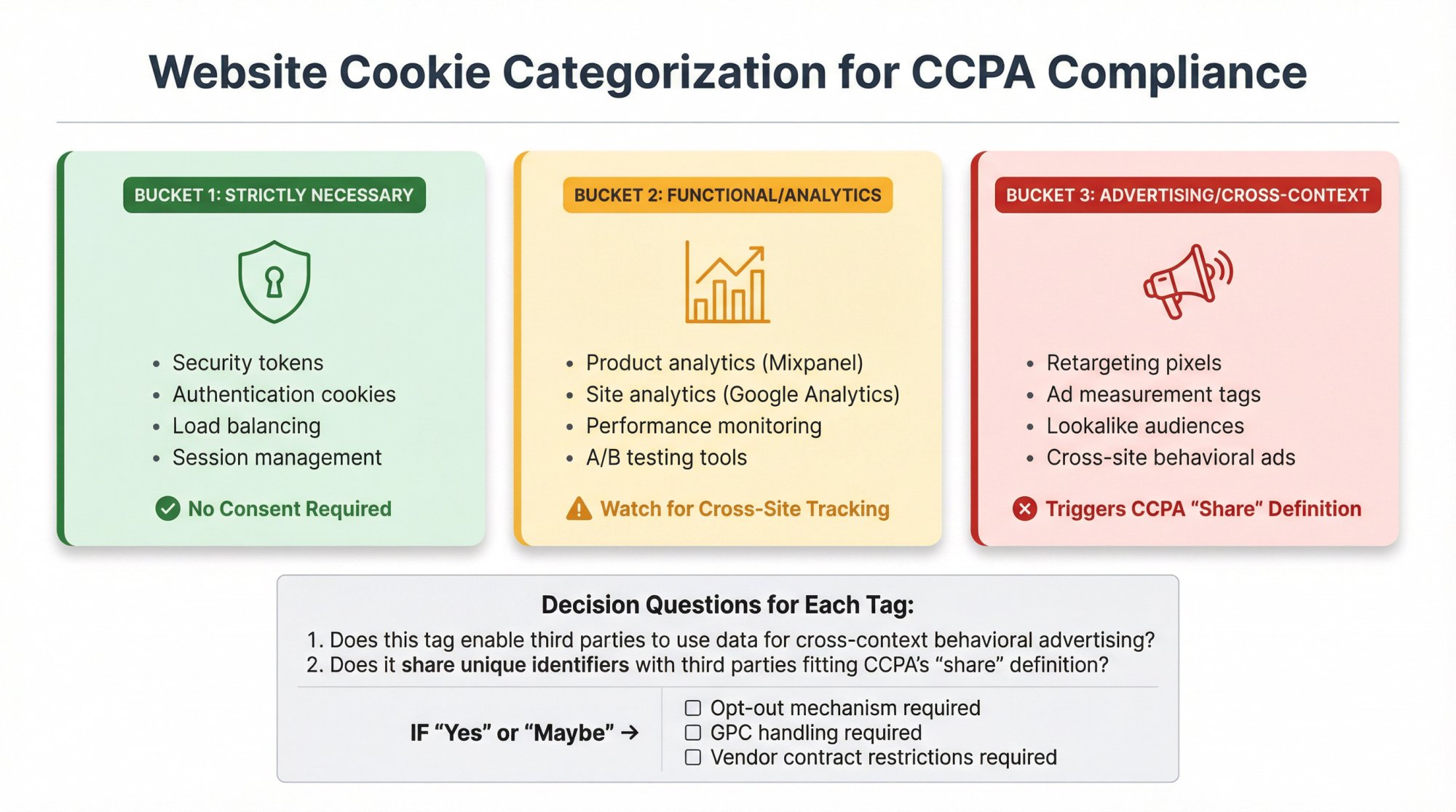
Map Your Website Tags Into Three Buckets
Bucket 1: Strictly necessary (security, authentication, load balancing)
These are fine. No consent issues.
Bucket 2: Functional/analytics (product analytics like Mixpanel, site analytics like Google Analytics)
Often okay but watch for configurations that enable cross-site tracking.
Bucket 3: Advertising/cross-context (retargeting pixels, ad measurement, lookalike audiences)
This is where "share" definitions get triggered.
Then ask for each tag:
→ Does this tag enable third parties to use data for cross-context behavioral advertising?
→ Does it share unique identifiers with third parties in a way that fits CCPA's "share" definition?
If "yes" or "maybe," you need:
- An opt-out mechanism
- GPC handling
- Proper vendor contracts with restrictions
⚠️ ENFORCEMENT REALITY: CPPA guidance and enforcement history suggests this isn't theoretical. Companies are getting called out for cookie-based sharing without proper opt-out infrastructure.
What Changed in CCPA Enforcement (2024-2025 Updates)

The CPPA Is Actively Enforcing
The California Privacy Protection Agency has administrative enforcement authority and has issued guidance on key topics like opt-out preference signals. They're not waiting for egregious cases.
Regulations Continue Evolving
Modified regulation text dated July 2025 signals that teams should treat CCPA/CPRA as a living program, not a one-time policy update. Quarterly reviews of regulatory changes should be standard.
Automated Decision-Making Discussion
CPPA rulemaking has included discussion around automated decision-making technology. Even if your startup isn't using algorithmic decision systems yet, enterprise customers increasingly ask about it in security reviews.
If you use AI/ML for pricing, fraud detection, user scoring, hiring, or personalization, start documenting:
- What models do
- What inputs are used
- How humans can review or override decisions
- What disclosures you may need later
CCPA Enforcement Patterns You Need to Know
Even without reading every enforcement action, consistent patterns emerge:

CRITICAL ENFORCEMENT PATTERNS:Your disclosures must match actual data flows The fastest way to trigger enforcement is a privacy policy that says one thing while your systems do another.Opt-out must actually work Especially for online tracking contexts. Regulators test whether the "Do Not Sell" link actually stops the data sharing.Preference signals matter GPC is not optional if you're selling/sharing. Treat it as a compliance requirement, not a nice-to-have."We didn't mean to" isn't a defense Particularly if adtech pipelines are in place. Ignorance of your own data flows doesn't protect you from enforcement.
30-Day CCPA Implementation Plan for Startups
Here's a realistic timeline that keeps engineering time low while producing real deliverables:
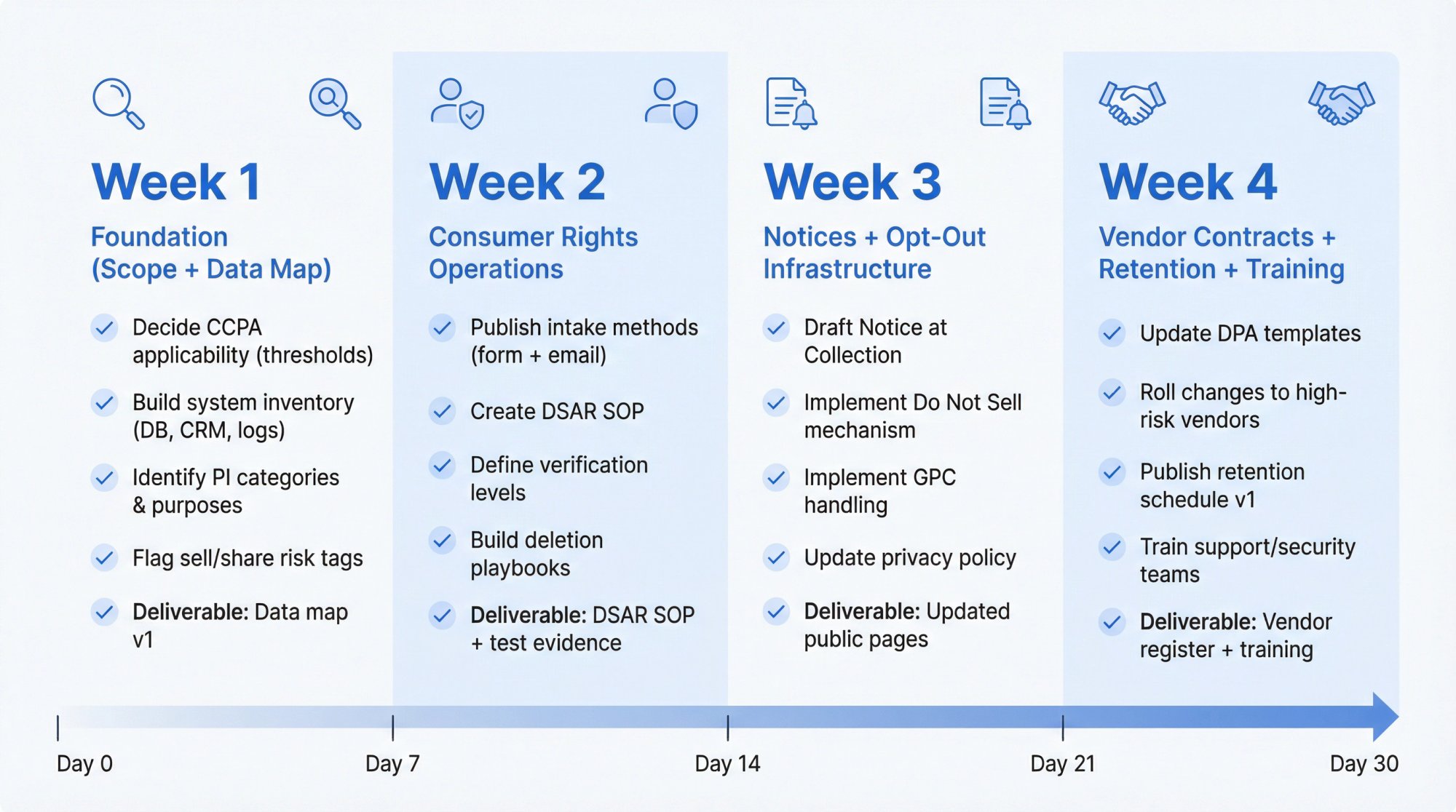
Week 1: Foundation (Scope + Data Map)
Goals:
- Decide definitively whether CCPA applies (thresholds + California footprint)
- Build system inventory: product DB, CRM, billing, support, analytics, logs
- Identify PI categories and processing purposes
- Identify third-party disclosures
- Flag potential "sell/share" risk tags (pixels, ad partners)
Deliverables: Data map v1, vendor list v1, tag inventory v1
Week 2: Consumer Rights Operations
Goals:
- Publish intake methods (form + email)
- Create DSAR SOP and run one tabletop test request end-to-end
- Define verification levels for different request types
- Build deletion and correction playbooks per system owner
Deliverables: DSAR SOP, test evidence showing you can fulfill requests, ticket workflow configured
Week 3: Notices + Opt-Out Infrastructure
Goals:
- Draft Notice at Collection and update privacy policy
- If selling/sharing: implement "Do Not Sell or Share" mechanism
- Implement GPC handling where required
- If using sensitive PI beyond permitted purposes: implement limitation mechanism
Deliverables: Updated public pages, screenshots documenting changes, change log
Week 4: Vendor Contracts + Retention + Training
Goals:
- Update DPA templates and vendor clauses (distinguish service provider vs. third party)
- Roll changes to high-risk vendors first (support, auth, payments, analytics, adtech)
- Publish retention schedule v1
- Train customer support, security, and ops teams on DSAR handling
Deliverables: Contract addendum template, updated vendor register, retention schedule, training evidence
Master Implementation Checklist
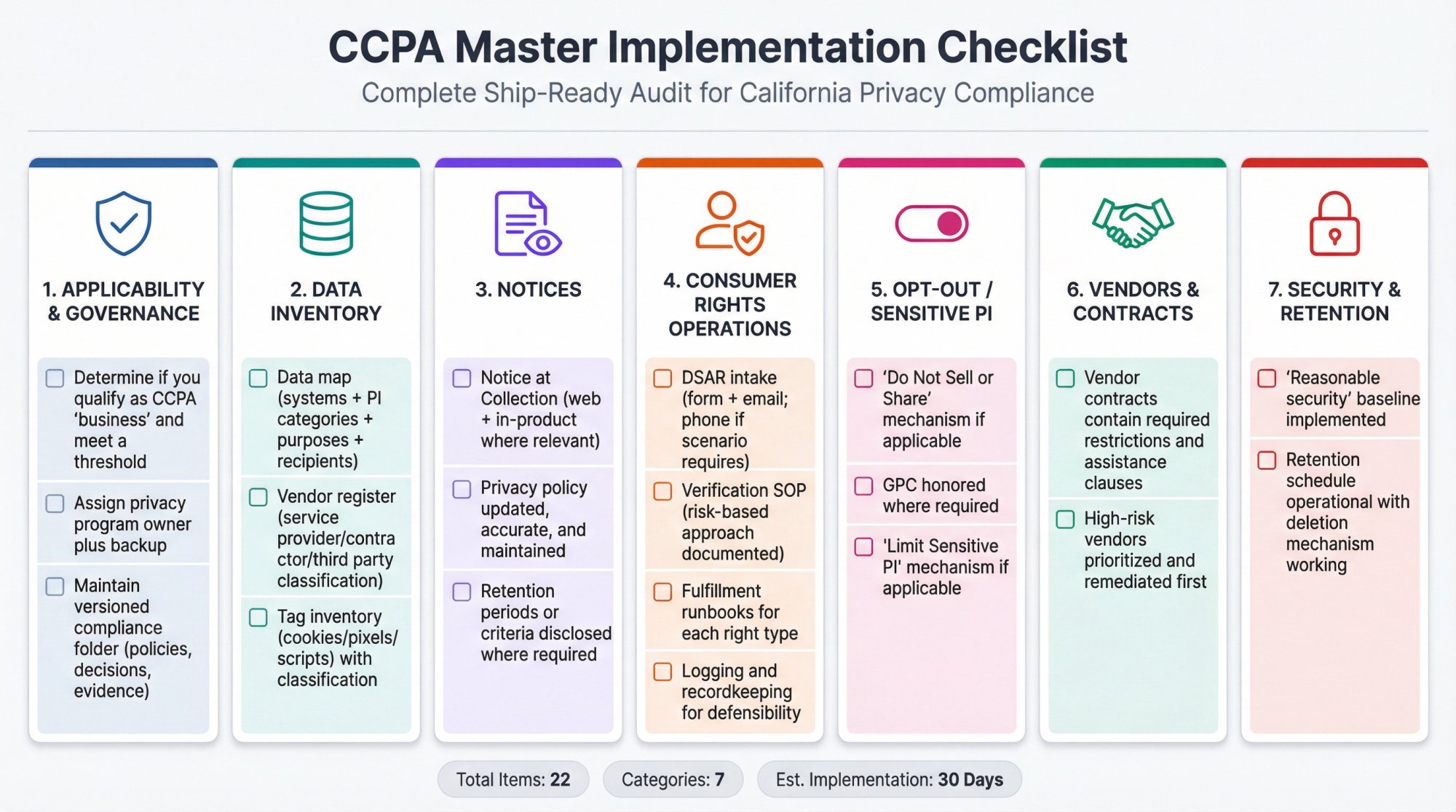
Use this as your ship list:
Applicability & Governance
- Determine if you qualify as CCPA "business" and meet a threshold
- Assign privacy program owner plus backup
- Maintain versioned compliance folder (policies, decisions, evidence)
Data Inventory
- Data map (systems + PI categories + purposes + recipients)
- Vendor register (service provider/contractor/third party classification)
- Tag inventory (cookies/pixels/scripts) with classification
Notices
- Notice at Collection (web + in-product where relevant)
- Privacy policy updated, accurate, and maintained
- Retention periods or criteria disclosed where required
Consumer Rights Operations
- DSAR intake (form + email; phone if scenario requires)
- Verification SOP (risk-based approach documented)
- Fulfillment runbooks for each right type
- Logging and recordkeeping for defensibility
Opt-Out / Sensitive PI
- "Do Not Sell or Share" mechanism if applicable
- GPC honored where required
- "Limit Sensitive PI" mechanism if applicable
Vendors & Contracts
- Vendor contracts contain required restrictions and assistance clauses
- High-risk vendors prioritized and remediated first
Security & Retention
- "Reasonable security" baseline implemented
- Retention schedule operational with deletion mechanism working
How Comp AI Accelerates CCPA Implementation
Most startups spend 2-6 months assembling a CCPA compliance program through spreadsheets, policy documents, and manual vendor tracking. That timeline works if compliance is a nice-to-have. It doesn't work when an enterprise deal is blocked on privacy documentation or you're racing to avoid enforcement exposure.
Comp AI removes the friction by automating the evidence collection, policy generation, and workflow management that typically bogs down small teams. Instead of spending months duct-taping a program together, you get:
Centralized compliance hub:
All policies, controls, evidence, and vendor tracking in one place rather than scattered across Google Docs, spreadsheets, and email threads.
Automated evidence collection:
Integration with 100+ tools means we pull evidence automatically (user access lists from Okta, encryption configs from AWS, training records from HR systems) instead of you manually gathering screenshots. Learn more about our automated evidence collection capabilities.
Pre-built policy templates:
CCPA-compliant privacy policies, notices at collection, and DSAR procedures tailored to your actual data flows rather than generic templates that don't match your business.
DSAR workflow automation:
Request intake, verification, routing, fulfillment, and logging handled through a systematic workflow rather than ad-hoc email responses.
Vendor contract management:
Track vendor classifications, generate required DPA clauses, monitor contract status rather than maintaining it in spreadsheets that go stale.
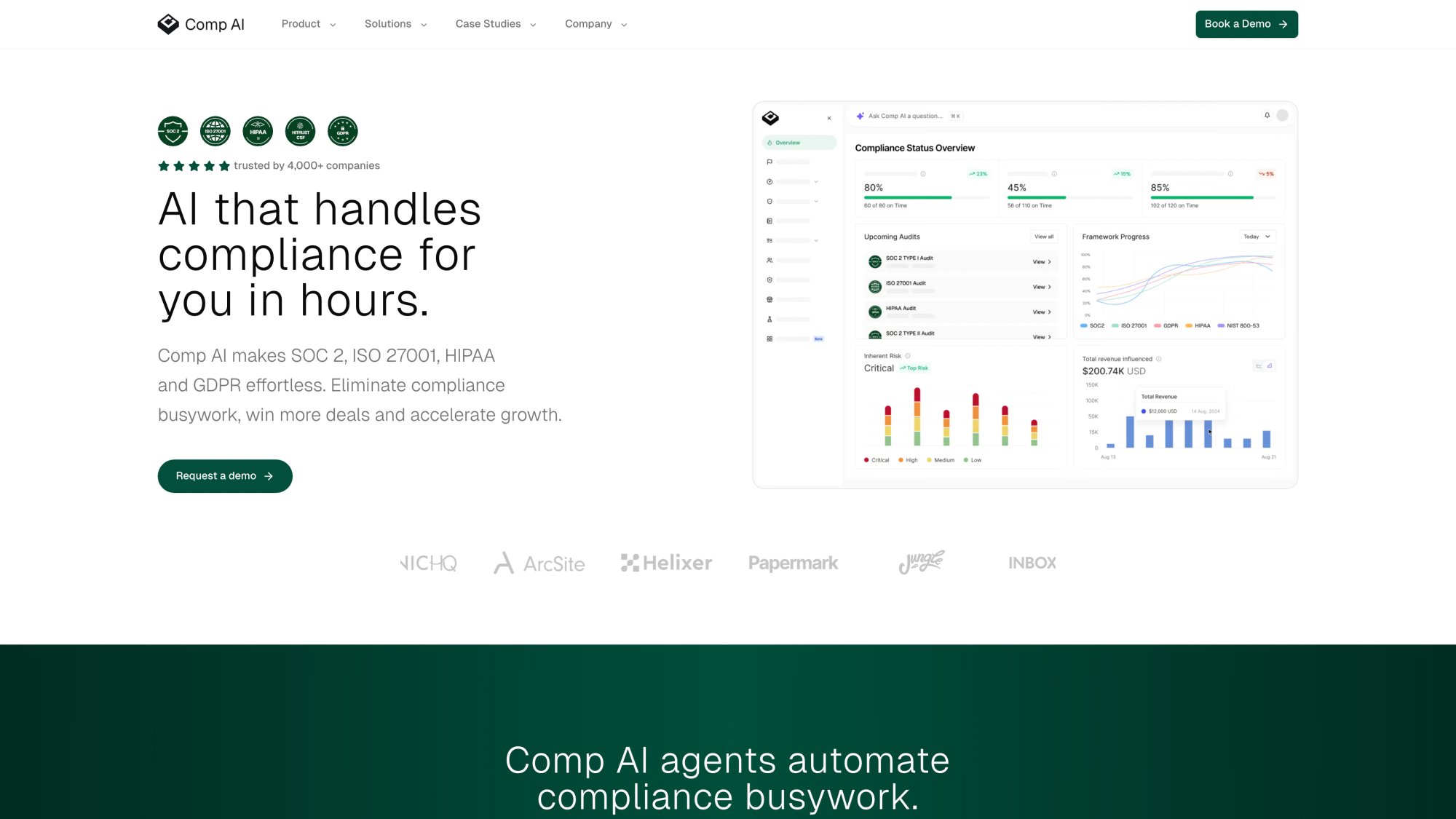
If you're implementing CCPA compliance manually, plan for weeks of your team's time. With our compliance automation platform, companies typically achieve CCPA readiness in 5-10 hours of actual work (mostly review and approval, not building from scratch).
Frequently Asked Questions

Frequently Asked Questions
Does CCPA apply to B2B data?
CCPA applies to personal information of California residents, including business contacts (employees, contractors, B2B customers). The regulations have specific provisions for B2B and employee data, but if you process it, you're generally in scope.
Can we use a generic privacy policy template?
Technically yes, but it's risky. Your privacy policy must accurately describe your actual data practices. Generic templates often don't match what your systems actually do, creating enforcement exposure. Build your data inventory first, then write (or customize) the policy to match reality.
How do we handle DSAR requests if we use lots of SaaS tools?
This is where most startups struggle. The answer is systematic: map where personal information lives (your data inventory from Week 1), create query procedures for each system, and document the process. Service provider contracts should require vendors to assist with consumer requests, which helps.
What if we accidentally violated CCPA before implementing compliance?
CCPA enforcement typically focuses on ongoing compliance, not past violations (unless egregious or resulting in breach). The practical approach: fix your program now, document the changes, and reduce forward-looking risk. Consult legal counsel if you have specific concerns about past practices.
Do we need a privacy lawyer to implement CCPA?
For final review and edge cases, yes. For the operational implementation (building data maps, setting up workflows, writing SOPs), no. Most of CCPA compliance is operational work (mapping systems, configuring tools, training teams) that your internal team can handle with the right guidance and tools.
How often should we update our CCPA compliance program?
Quarterly reviews are recommended to catch: new vendors added, new data processing activities, regulatory changes, and gaps identified through practice. Annual comprehensive reviews should include testing your DSAR workflow, updating retention schedules, and refreshing training.
What's the difference between CCPA and CPRA?
CPRA (California Privacy Rights Act) amended CCPA with additional requirements effective 2023. When people say "CCPA" in 2025, they typically mean CCPA as amended by CPRA. The regulations are jointly administered by the California Privacy Protection Agency. For implementation purposes, just follow current CCPA/CPRA requirements rather than trying to distinguish historical versions.
Can we handle CCPA compliance in-house or do we need consultants?
Small teams can absolutely handle CCPA compliance in-house with the right tools and guidance. The 30-day plan outlined above is designed for exactly that scenario. Consultants can help if you have complex multi-framework requirements (CCPA + GDPR + HIPAA simultaneously) or unique edge cases, but for straightforward B2B SaaS CCPA compliance, in-house implementation with automation support is realistic and cost-effective.