Cloud Security Compliance Guide for SaaS Teams (2025)
Complete guide to cloud security compliance for startups: 12 essential controls, framework comparisons, and a 30-day audit readiness roadmap.
If you're a B2B SaaS founder or CTO, you've probably received a customer questionnaire asking about SOC 2, ISO 27001, or HIPAA compliance. These requests aren't going away. Actually, they're becoming table stakes for enterprise deals.
The good news? Cloud security compliance is completely achievable for small teams. The challenge isn't technical complexity. It's knowing which controls matter, how to set them up efficiently, and how to prove they're working.
This guide walks you through everything you need to know about cloud security compliance. We'll cover the frameworks buyers care about, the control baseline that satisfies most requirements, and how modern automation can get you audit-ready in days instead of months.
Why SaaS Companies Need Cloud Security Compliance
Here's what happens when you try to close a deal with an enterprise buyer:
Your champion loves your product. Procurement is ready to sign. Then the security team sends a 300-question vendor assessment asking about your compliance certifications, security controls, and audit reports.
If you can't prove your security posture, the deal stalls. Buyers need evidence that you protect their data, handle incidents properly, and maintain secure infrastructure.
This isn't theoretical risk. According to research from industry analysts, 75% of enterprise security leaders require vendor compliance certifications before approving new software purchases. If you're a <100 person startup trying to move upmarket, compliance becomes your unlock.
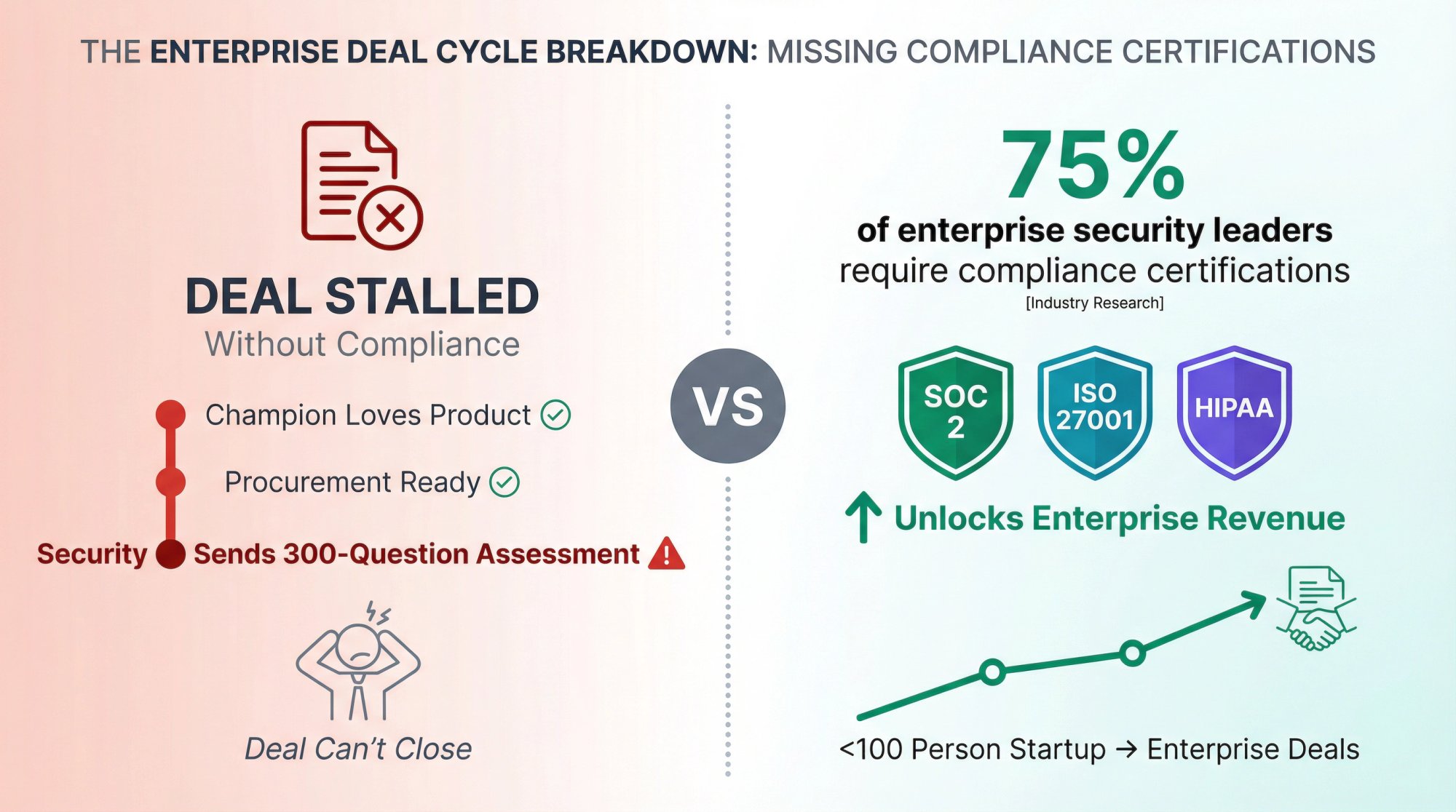
CRITICAL INSIGHT: Compliance isn't just about closing deals. Strong security controls protect your business from breaches, reduce your insurance premiums, and create operational discipline that scales with your company.
What is Cloud Security Compliance and Why Does It Matter?
Cloud security compliance means proving that your cloud infrastructure and processes meet specific security standards. These standards come from frameworks like SOC 2, ISO 27001, HIPAA, and GDPR.
Here's what compliance is NOT:
- It's not just running workloads in AWS, Azure, or GCP. The cloud provider gives you tools, but you must configure and operate them correctly.
- It's not a one-time project. Compliance requires continuous monitoring, evidence collection, and process improvement.
- It's not just about passing an audit. Real compliance means your controls protect customer data and prevent security incidents.
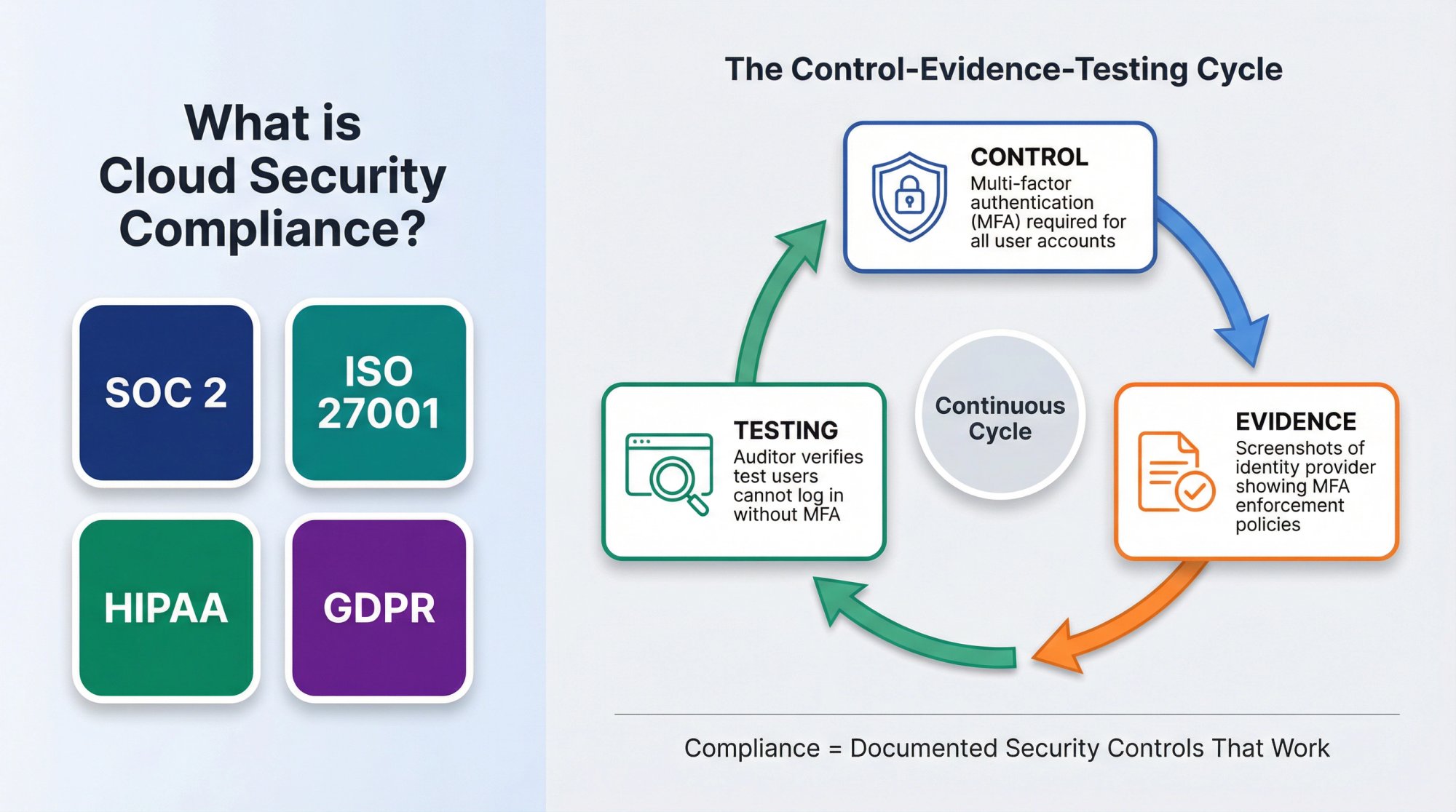
The core of cloud security compliance is setting up and documenting security controls. A control is a specific practice or mechanism that reduces risk. For example:
| Control Element | Description | Example |
|---|---|---|
| Control | Multi-factor authentication (MFA) required for all user accounts | |
| Evidence | Screenshots of your identity provider showing MFA enforcement policies | |
| Testing | Auditor verifies that test users can't log in without MFA |
When you pursue a compliance certification, an independent auditor examines your controls and evidence. They issue a report that your customers can review to verify your security posture.
How the Shared Responsibility Model Works in Cloud Compliance
Understanding where the cloud provider's responsibility ends and yours begins is essential for compliance success.
Cloud providers operate on a shared responsibility model. This is critical to understand because it defines what you must prove during an audit.
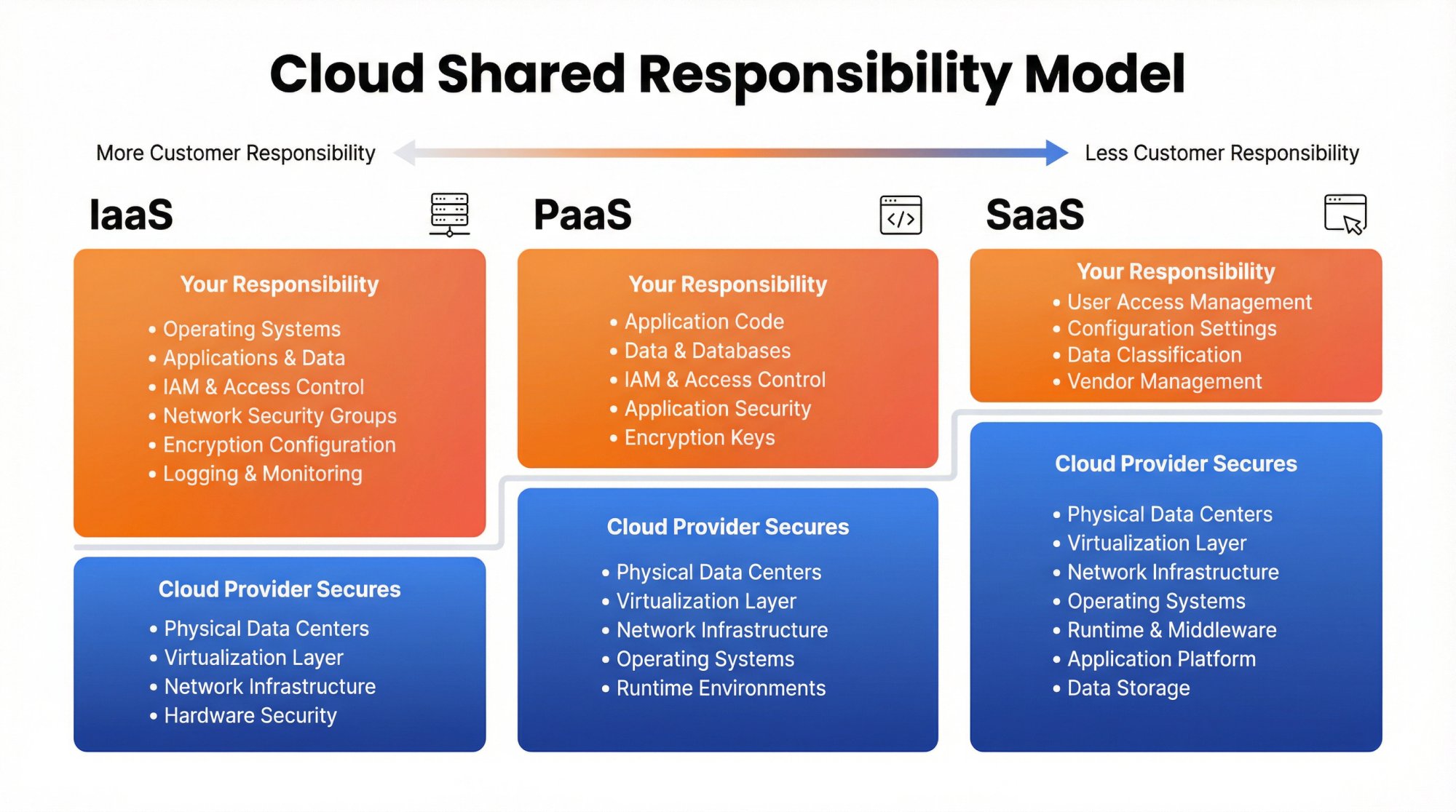
What the cloud provider secures (AWS, Azure, GCP):
- Physical data centers and hardware
- Virtualization and hypervisor layers
- Network infrastructure between availability zones
- Base operating systems for managed services
What you must secure (your responsibility):
- Identity and access management (IAM)
- Data encryption at rest and in transit
- Network security groups and firewall rules
- Application-level security controls
- Logging, monitoring, and incident response
- Vendor management and employee security
The dividing line shifts based on service type:
→ Infrastructure as a Service (IaaS): You manage everything above the virtualization layer
→ Platform as a Service (PaaS): Provider manages OS and runtime; you manage your code and data
→ Software as a Service (SaaS): Provider manages most infrastructure; you manage user access and configuration
For compliance purposes, you must document and prove controls for everything in your responsibility zone. You can reference the cloud provider's compliance certifications (their SOC 2, ISO 27001, etc.) for the infrastructure layer, but you still need evidence for your configuration and operations.
SOC 2 vs ISO 27001 vs HIPAA vs GDPR: Which Framework Do You Need?
Different customers require different frameworks based on their industry, location, and procurement policies. Here's what each major framework covers and when you need it.
Quick Comparison: SOC 2, ISO 27001, GDPR, HIPAA, and PCI-DSS
| Framework | Type | Primary Region | Timeline | Best For |
|---|---|---|---|---|
| SOC 2 Type I | Audit | North America | 24 hours - 4 weeks | Proving controls are designed correctly |
| SOC 2 Type II | Audit | North America | 3-12 months | Proving controls work over time |
| ISO 27001 | Certification | International | 3-6 months | Global enterprise buyers, EU market |
| GDPR | Legal Requirement | EU | Ongoing compliance | Any business with EU customers/data |
| HIPAA | Legal Requirement | United States | Ongoing compliance | Healthcare data processing |
| PCI-DSS | Industry Standard | Global | Ongoing compliance | Credit card data handling |
SOC 2 Type 1 vs Type 2: What's the Difference?
What it is: SOC 2 is a US-based auditing standard for service organizations. It evaluates your controls across five "Trust Service Criteria": Security, Availability, Processing Integrity, Confidentiality, and Privacy.
Most SaaS companies pursue SOC 2 Security only, which covers the baseline security controls.
Type I vs Type II:
- SOC 2 Type I: Auditor examines your controls at a single point in time. Proves you have controls designed properly. Can be completed quickly once controls are in place.
- SOC 2 Type II: Auditor observes your controls operating over 3-12 months (most commonly 6 months). Proves your controls work consistently over time. Required by most enterprise buyers.
When you need it: SOC 2 is the most common requirement from North American enterprise customers. If you're selling to healthcare, financial services, or large tech companies, expect SOC 2 Type II requests. Learn more about the differences between SOC 2 Type 1 and Type 2.
Timeline with automation: Achieving SOC 2 certification can be accelerated dramatically with the right platform. Modern automation can get you Type I ready in 24 hours, while Type II still requires the observation period but keeps you audit-ready throughout.
What is ISO 27001 and When Do You Need It?
What it is: ISO 27001 is an international standard for information security management systems (ISMS). It requires you to identify risks, use controls from Annex A (a catalog of 93 security controls), and maintain a continuous improvement process.
When you need it: ISO 27001 carries more weight internationally, especially in Europe. If you sell to EU companies or multinational enterprises, ISO 27001 often satisfies their procurement requirements.
How it differs from SOC 2: ISO 27001 is broader than SOC 2. It includes physical security, HR security, and business continuity. The audit process is more standardized globally, and the certification is issued by accredited certification bodies. Read our detailed ISO 27001 vs SOC 2 comparison to understand which framework best fits your business needs.
Timeline: Similar to SOC 2 Type II, achieving ISO 27001 certification typically requires 3-6 months for the observation period, plus audit time. Our ISO 27001 certification guide provides a complete roadmap.
GDPR: What EU Data Privacy Law Means for Your Business
What it is: GDPR is a privacy law, not a certification framework. It applies if you process personal data of EU residents. GDPR requires specific technical and organizational measures to protect data, plus processes for data subject rights (access, deletion, portability).
When you need it: If you have customers or users in the EU, GDPR applies. There's no optional compliance here. It's a legal requirement with significant penalties for violations (up to 4% of global revenue or €20 million, whichever is higher).
Key security requirements:
- Data encryption and pseudonymization
- Ability to restore access to data after incidents
- Regular testing of security measures
- Data processing agreements (DPAs) with vendors
- Data breach notification within 72 hours
How it relates to SOC 2/ISO 27001: GDPR doesn't replace security certifications, but strong SOC 2 or ISO 27001 controls provide evidence of GDPR's "appropriate technical and organizational measures." Many companies maintain both compliance certifications and GDPR compliance. See how these frameworks overlap in our SOC 2 vs GDPR comparison.
HIPAA Compliance Requirements for Healthcare Software
What it is: HIPAA is a US law governing protected health information (PHI). If you handle, store, or transmit PHI, you must comply with HIPAA Security and Privacy Rules.
When you need it: If you build healthcare software, integrate with electronic health records (EHRs), or process any patient health data, HIPAA compliance is mandatory. Learn how HIPAA compares to other frameworks in our HIPAA vs SOC 2 guide.
Key requirements:
- Business Associate Agreements (BAAs) with customers and vendors
- PHI encryption at rest and in transit
- Access controls and audit logging for PHI access
- Incident response and breach notification procedures
- Regular risk assessments
PCI-DSS: Do You Need Payment Card Compliance?
What it is: PCI-DSS is a set of requirements for organizations that store, process, or transmit credit card data. It's maintained by the major card brands (Visa, Mastercard, American Express, Discover).
When you need it: If you handle credit card information directly, PCI-DSS compliance is mandatory. Most SaaS companies avoid this by using payment processors (Stripe, Braintree, etc.) that handle card data on your behalf. If you use a compliant processor and never touch card data, your PCI scope is minimal.
Levels: PCI-DSS has four merchant levels based on transaction volume. Level 1 (6M+ transactions/year) requires annual on-site audits. Level 4 (<20K e-commerce transactions/year) only requires a Self-Assessment Questionnaire (SAQ).
12 Essential Cloud Security Controls Every SaaS Company Needs
Rather than treating each framework separately, smart teams set up one comprehensive control baseline that satisfies multiple frameworks at once. Here are the 12 control areas that form the foundation of cloud security compliance.
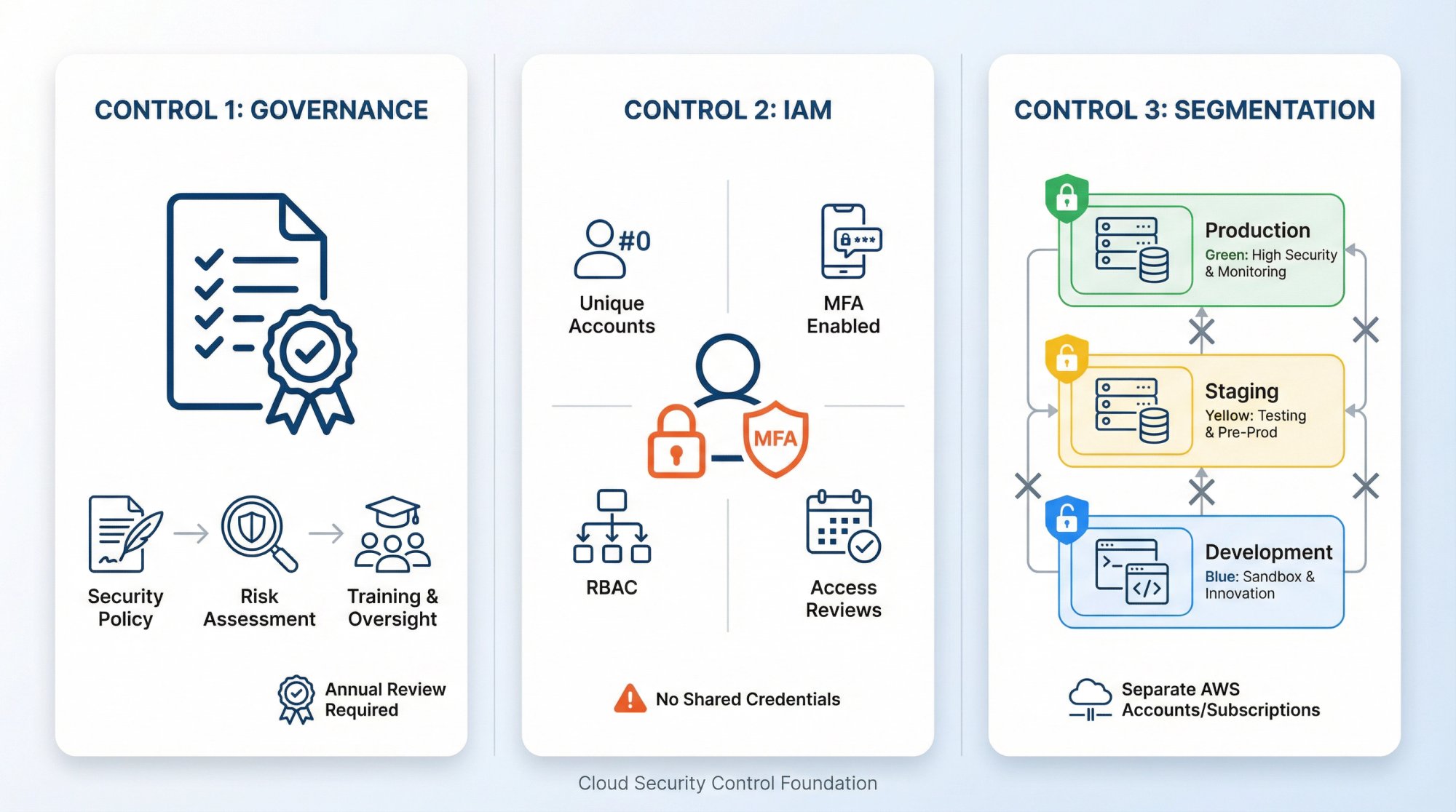
1. How to Set Up Governance and Risk Management for Compliance
What it covers: Your information security program structure, risk assessment process, and policy framework.
Key controls:
- Written information security policy (reviewed annually)
- Executive ownership and accountability for security
- Annual risk assessment identifying threats, vulnerabilities, and impacts
- Risk treatment decisions (accept, mitigate, transfer, avoid)
- Security awareness training policy for all employees
Evidence you'll need:
- Board or executive meeting minutes showing security program approval
- Risk assessment documentation with scoring methodology
- Training completion records
- Policy approval signatures and distribution proof
Why it matters: Frameworks like ISO 27001 require documented risk management. Even for SOC 2, auditors want to see that you identify and manage security risks systematically.
2. How to Implement Identity and Access Management (IAM) for Audit Success
What it covers: How you control who can access what systems and data.
Key controls:
- Unique user accounts for every person (no shared credentials)
- Multi-factor authentication and password policy for all accounts
- Role-based access control with least privilege
- Quarterly access reviews to verify permissions
- Immediate access revocation upon termination
Evidence you'll need:
- Screenshots of your identity provider (Okta, Azure AD, Google Workspace) showing MFA enforcement
- Access review spreadsheets with approval signatures
- Termination tickets showing same-day access removal
- Role definitions and permission mappings
Cloud-specific setup:
→ Use SSO/SAML for all SaaS applications
→ Enforce MFA at the identity provider level (Okta, Azure AD)
→ Use AWS IAM roles and policies (avoid long-lived access keys)
→ Use just-in-time (JIT) access for elevated privileges
⚠️ COMMON PITFALL: Service accounts and API keys often bypass MFA and access controls. Document every service account, rotate credentials regularly, and store them in a secrets manager (AWS Secrets Manager, HashiCorp Vault).
3. Cloud Account Structure and Segmentation Best Practices
What it covers: How you organize cloud resources and isolate different environments.
Key controls:
- Separate AWS accounts/Azure subscriptions for production, staging, and development
- Network segmentation between tiers (web, application, database)
- Dedicated management account for centralized logging and security tooling
- Organization-level guardrails preventing dangerous configurations
Evidence you'll need:
- Cloud account structure diagrams
- Network topology diagrams showing VPC/subnet design
- Service Control Policies (SCPs) or Azure Policies enforcing baseline security
- Screenshots of account isolation and cross-account role configurations
Why it matters: If your development environment gets compromised, you don't want attackers pivoting to production. Segmentation limits blast radius and makes compliance scoping easier (you can exclude non-production environments from some audits).
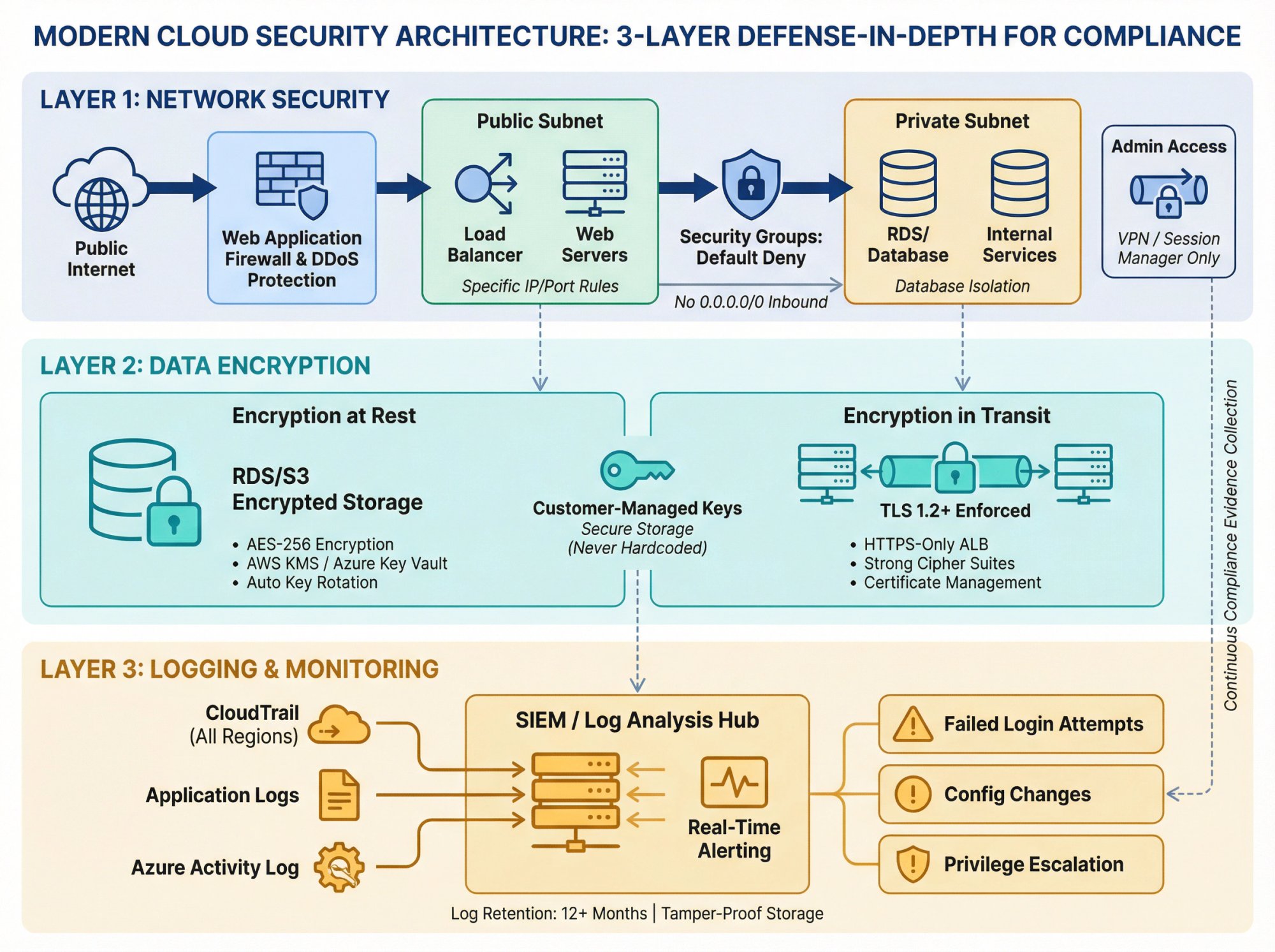
4. Network Security Controls for Cloud Compliance
What it covers: How you protect network boundaries and control traffic flow.
<table><thead><tr><th>Control Category</th><th>Implementation</th><th>Evidence Required</th></tr></thead><tbody><tr><td>Security Groups</td><td>Default-deny rules with specific IP/port allowances</td><td>Configuration screenshots, rule sets</td></tr><tr><td>Database Isolation</td><td>No direct internet access to databases/internal services</td><td>Network diagrams, routing tables</td></tr><tr><td>Administrative Access</td><td>VPN or private connectivity for admin operations</td><td>VPN access logs, connection records</td></tr><tr><td>WAF Protection</td><td>Web application firewall protecting public endpoints</td><td>Rule sets, blocking statistics</td></tr><tr><td>DDoS Protection</td><td>Shield/protection services enabled</td><td>Configuration proof, capacity settings</td></tr></tbody></table>
Cloud-specific setup:
→ Use AWS Security Groups with specific IP/port rules (avoid 0.0.0.0/0 for inbound)
→ Place databases in private subnets with no internet gateway
→ Use AWS Systems Manager Session Manager instead of SSH bastion hosts
→ Enable AWS Shield or Azure DDoS Protection
Learn more about implementing a comprehensive network security policy.
5. Data Encryption Requirements: At Rest and In Transit
What it covers: How you protect data confidentiality using cryptographic controls.
Key controls:
- All data encrypted at rest (databases, object storage, volumes)
- All data encrypted in transit (TLS 1.2+ for all connections)
- Customer-managed encryption key management
- Regular key rotation
- Secure key storage (never hardcoded)
Evidence you'll need:
- Database encryption settings (RDS encryption, Azure SQL TDE)
- S3 bucket encryption policies
- TLS certificate configurations and cipher suites
- Key rotation logs from KMS or Key Vault
Cloud-specific setup:
→ Enable default encryption on S3 buckets and RDS instances
→ Use AWS KMS or Azure Key Vault for key management
→ Enforce HTTPS-only for application load balancers
→ Disable weak TLS versions (<1.2) in CloudFront and application configs
⚠️ COMMON PITFALL: Developers often disable TLS in local environments and forget to re-enable it. Use infrastructure-as-code (Terraform, CloudFormation) to enforce encryption settings consistently.
6. How to Set Up Logging and Monitoring for Audit Evidence
What it covers: How you collect, retain, and analyze security-relevant events.
Key controls:
- Centralized log collection from all systems (CloudTrail, Azure Activity Log, application logs)
- Log retention for at least 12 months (some frameworks require 7 years)
- Real-time alerting on critical events (failed logins, privilege escalations, configuration changes)
- Log integrity protection (prevent tampering)
- Security Information and Event Management (SIEM) or log analysis
Evidence you'll need:
- CloudTrail/Activity Log configurations showing all regions enabled
- Log retention policies (S3 lifecycle, Log Analytics retention)
- Alert rule configurations (CloudWatch Alarms, Azure Monitor)
- Sample security alerts and response actions
Cloud-specific setup:
→ Enable AWS CloudTrail organization trail capturing all API calls
→ Send logs to a dedicated security account (not modifiable by app teams)
→ Use CloudWatch Logs Insights or Splunk for analysis
→ Alert on dangerous actions: disabling CloudTrail, creating internet gateways, changing security groups to 0.0.0.0/0
LOGGING: YOUR AUDIT EVIDENCE FOUNDATIONLogs are the primary evidence for control testing. If you can't prove an access review happened or a vulnerability was patched, auditors fail the control. Comprehensive logging and monitoring also helps you detect and respond to security incidents.
7. Vulnerability Management: Finding and Fixing Security Weaknesses
What it covers: How you identify and fix security weaknesses in your infrastructure and applications.
Key controls:
- Automated vulnerability management scanning of infrastructure (every 30 days minimum)
- Application security testing (SAST, DAST, dependency scanning)
- Critical vulnerabilities fixed within 30 days
- High vulnerabilities fixed within 90 days
- Quarterly penetration testing (annual minimum)
Evidence you'll need:
- Vulnerability scan reports (Qualys, Tenable, AWS Inspector)
- Remediation tracking (Jira tickets showing fix and validation)
- Penetration test reports with management responses
- Patch management logs (OS patches, library updates)
Cloud-specific setup:
→ Use AWS Inspector or Azure Defender for infrastructure scanning
→ Integrate Snyk or Dependabot into CI/CD for dependency scanning
→ Run Burp Suite or OWASP ZAP for web app testing
→ Maintain an inventory of all public-facing assets (easier in cloud with tagging)
⚠️ DOCUMENTATION TRAP: Teams fix high-severity CVEs but forget to document remediation. Create a ticketing workflow: scanner finds vulnerability, Jira ticket created, engineer fixes, scanner re-runs, ticket closed with evidence.
8. Secure Software Development Lifecycle (SDLC) Best Practices
What it covers: How you build security into your development process.
Key controls:
- Code review required before production deployment
- Automated testing in CI/CD pipelines
- Branch protection preventing direct commits to main
- Secrets scanning to prevent credential exposure
- Separation of duties (developers can't deploy to production alone)
Evidence you'll need:
- GitHub/GitLab branch protection settings
- Pull request approval logs
- CI/CD pipeline configurations (GitHub Actions, Jenkins)
- Secrets scanner results (TruffleHog, GitGuardian)
Cloud-specific setup:
→ Use infrastructure-as-code (Terraform, Pulumi) for all deployments
→ Scan IaC for misconfigurations with Checkov or tfsec
→ Require MFA and code review for production deployments
→ Use AWS CodePipeline or Azure DevOps with approval gates
Why it matters: If attackers compromise a developer account, strong secure software development controls prevent them from pushing malicious code to production. Branch protection and code review create defense in depth.
9. Data Protection and Privacy Controls for Compliance
What it covers: How you classify, handle, and protect sensitive data throughout its lifecycle.
Key controls:
- Data classification and handling scheme (public, internal, confidential, restricted)
- Data retention and disposal policies
- Privacy controls for personally identifiable information (PII)
- Data loss prevention (DLP) for sensitive data
- Backup and recovery procedures (tested quarterly)
Evidence you'll need:
- Data classification policy
- Data flow diagrams showing where sensitive data lives
- Backup restoration test results
- Data deletion procedures and execution logs
Cloud-specific setup:
→ Tag S3 buckets and RDS instances by data classification
→ Use AWS Macie or Azure Information Protection for PII discovery
→ Use S3 lifecycle policies for automatic data deletion
→ Test database restores from RDS snapshots or Azure backups
⚠️ BACKUP REALITY CHECK: Many teams back up production data but never test restoration. Quarterly restore tests prove your backups work and satisfy disaster recovery requirements.
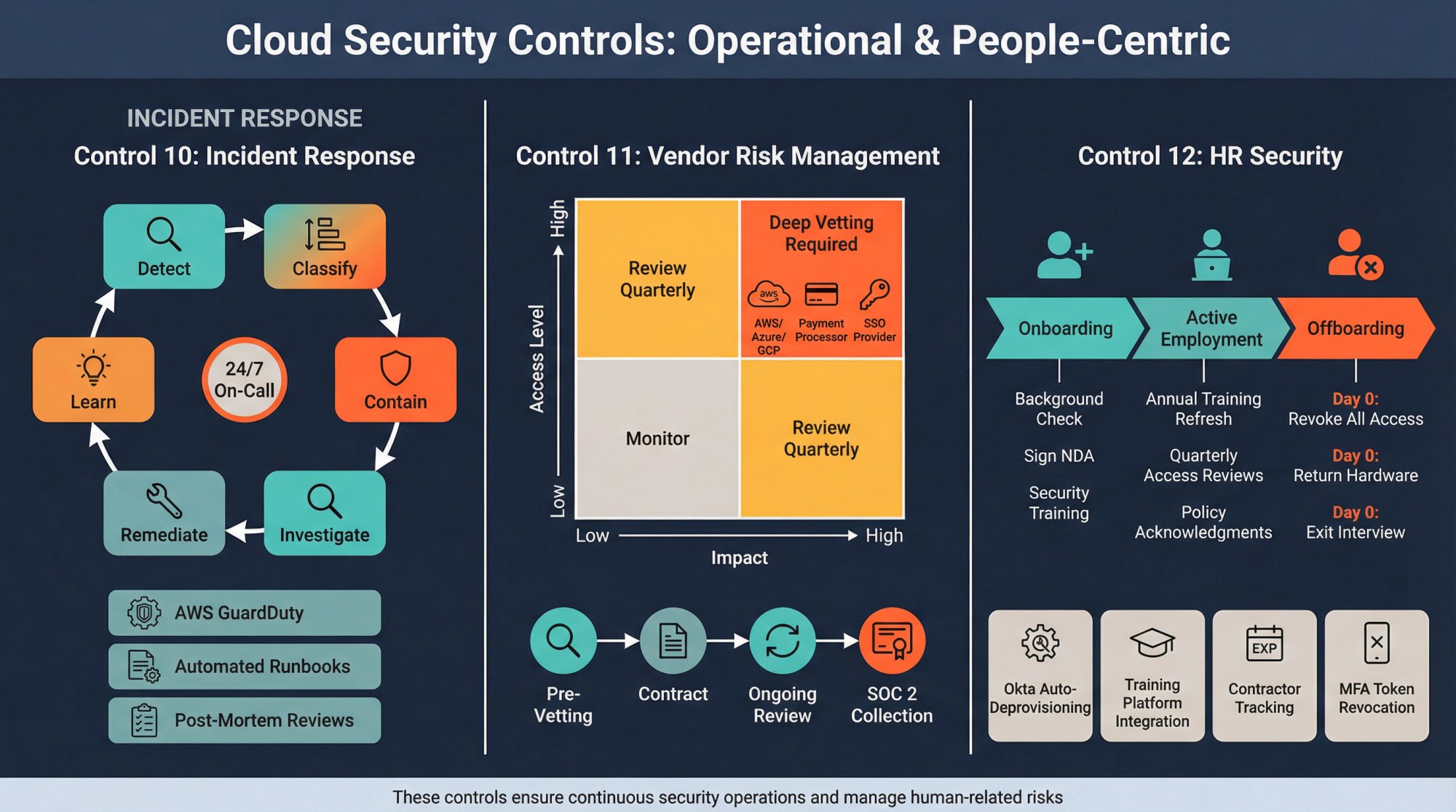
10. How to Create an Incident Response Plan That Auditors Approve
What it covers: How you detect, respond to, and recover from security incidents.
Key controls:
- Written incident response policy with roles and escalation
- Incident classification and severity levels
- On-call rotation for security incidents
- Post-incident reviews (lessons learned)
- Annual tabletop exercises testing the plan
Evidence you'll need:
- Incident response plan document
- On-call schedules (PagerDuty, Opsgenie)
- Incident tickets with timestamps and actions (ServiceNow, Jira)
- Tabletop exercise agendas and participant sign-in sheets
- Post-mortem reports for actual incidents
Cloud-specific setup:
→ Use AWS GuardDuty or Azure Sentinel for threat detection
→ Create runbooks for common incidents (compromised credentials, data exposure)
→ Automate response actions with AWS Lambda or Azure Functions
→ Practice containment: isolate compromised EC2 instances by changing security groups
PROVING YOUR INCIDENT READINESSAuditors want proof that you can handle a breach. If you've never had an incident, the tabletop exercise is your evidence. If you have had incidents, post-mortems prove you learn and improve.
11. Third-Party and Vendor Risk Management: What Auditors Look For
What it covers: How you assess and manage security risks from vendors and contractors.
Key controls:
- Vendor inventory tracking all third-party services
- Vendor risk assessments before onboarding
- Contracts requiring vendors to maintain security standards
- Annual vendor reviews (SOC 2 reports, questionnaires)
- Vendor access monitored and restricted
Evidence you'll need:
- Vendor inventory spreadsheet with risk tiers
- Vendor security questionnaires and SOC 2 reports
- Contract clauses requiring security and confidentiality
- Access logs showing which vendors can access your systems
Cloud-specific setup:
→ Track all SaaS integrations (Okta app list, AWS IAM SAML providers)
→ Require SSO for vendor access (easier to revoke)
→ Use modern compliance platforms to automate vendor tracking
→ Tier vendors by risk: payment processors and cloud providers are high-risk
Common pitfall: Teams track major vendors (AWS, Stripe) but forget about smaller SaaS tools. Every tool with access to customer data or production systems counts.
12. Human Resources Security Controls for Compliance
What it covers: How you ensure employees and contractors understand and follow security policies.
Key controls:
- Background checks for employees with access to sensitive systems
- Signed confidentiality agreements (NDAs)
- Security awareness training (onboarding + annual refresher)
- Acceptable use policy covering devices and data
- Termination procedures ensuring immediate access revocation
Evidence you'll need:
- Signed NDAs and employment agreements
- Training completion records (KnowBe4, SecurityAdvisor)
- Background check reports (redacted for privacy)
- Termination checklists with access removal confirmations
Cloud-specific setup:
→ Automate deprovisioning with Okta Workflows or Azure AD
→ Revoke MFA devices and hardware tokens on day of termination
→ Review AWS IAM users quarterly; delete unused accounts
→ Track contractor access with expiration dates
Why it matters: Insider threats (malicious or accidental) cause significant data breaches. HR security controls reduce risk from employees and ensure quick response when someone leaves.
How to Collect and Manage Audit Evidence Without Losing Your Mind
Controls are only as good as your ability to prove they're working. During an audit, you'll need to provide evidence for each control. Here's what auditors expect.
4 Types of Evidence Auditors Request
| Evidence Type | Description | Example Use Case |
|---|---|---|
| Point-in-time | Screenshots or exports showing a setting/configuration at a specific moment | Screenshot of MFA enforcement policy in Okta dated December 15, 2025 |
| Population | Lists showing all items in a category, often used for sampling | Complete user access list from AWS IAM (auditor selects 10 random users to test) |
| Operating | Logs or records showing a control executed over time | Access review spreadsheet with quarterly reviews over the past 12 months |
| Test results | Reports from tools proving a control outcome | Vulnerability scan report showing no critical findings in production |
What Evidence Will Auditors Request From You?
Expect auditors to ask for these items across most frameworks:
Access controls:
- Complete list of all user accounts in production systems
- Access review records (who approved, when, what changed)
- Termination evidence for departed employees (access removed same day)
Change management:
- Sample of production changes (pull requests, deployment logs)
- Code review approvals
- Rollback procedures and test
Vulnerability management:
- Most recent vulnerability scan reports
- Remediation tickets for high/critical findings
- Penetration test report with management response
Logging and monitoring:
- CloudTrail or equivalent logs covering the observation period
- Security alert configurations
- Sample incidents and response actions
Vendor management:
- Vendor inventory
- SOC 2 reports from critical vendors (AWS, database providers, payment processors)
- Contracts with security requirements
How to Automate Evidence Collection (Stop Manual Screenshots)
The traditional approach: manually screenshot every setting, export CSVs, organize files in folders, upload to the auditor's portal. This takes weeks and drives engineers crazy.
Modern automated evidence collection changes the game. It continuously collects proof across your entire stack without manual work.
How to Maintain Continuous Compliance: Your Quarterly Cadence
CONTINUOUS COMPLIANCE PRINCIPLE: Compliance isn't a one-time project. The controls you set up must operate continuously. Here's a lightweight cadence that keeps you always audit-ready.
Supported by continuous compliance monitoring, this approach ensures you're never scrambling for evidence.
What Compliance Tasks Should You Do Monthly?
| Task Category | Activities | Quick Wins |
|---|---|---|
| Security Metrics Review | • Failed login attempts and MFA bypass attempts | |
| • Critical/high vulnerabilities detected and time-to-remediation | ||
| • Unauthorized configuration changes | ||
| • New vendor integrations requiring review | • Review new user accounts added in past 30 days | |
| • Check for any disabled logging or monitoring | ||
| • Verify backup restoration tests scheduled |
Your Quarterly Compliance Checklist
Access reviews:
- Export complete user lists from Okta, AWS, GitHub, etc.
- Managers approve or revoke each direct report's access
- IT/Security reviews service accounts and privileged roles
- Document findings and access removals
Vulnerability management:
- Run full infrastructure scans (AWS Inspector, Qualys)
- Triage new findings and assign remediation owners
- Verify previous quarter's vulns were fixed
Vendor reviews:
- Check if any vendor SOC 2 reports expired
- Request updated reports or security questionnaires
- Review any new vendors added to the stack
Policy review:
- Read through security policies and update if needed
- Distribute updated policies to employees
- Collect acknowledgment signatures
Annual Compliance Tasks You Can't Skip
Risk assessment:
→ Identify new threats (new attack vectors, regulatory changes)
→ Re-evaluate existing risk scores
→ Update risk treatment plans
Penetration testing:
→ Hire external firm for full pentest
→ Fix findings and re-test critical items
→ Present results to executives/board
Security awareness training:
→ Deliver annual training (phishing, data handling, incident reporting)
→ Track completion rates
→ Run phishing simulations to test effectiveness
Disaster recovery test:
→ Execute full DR runbook (restore from backups, failover to secondary region)
→ Document issues encountered
→ Update DR procedures
Audit:
→ Schedule your SOC 2 Type II or ISO 27001 surveillance audit
→ Gather evidence for the observation period
→ Review and publish audit report
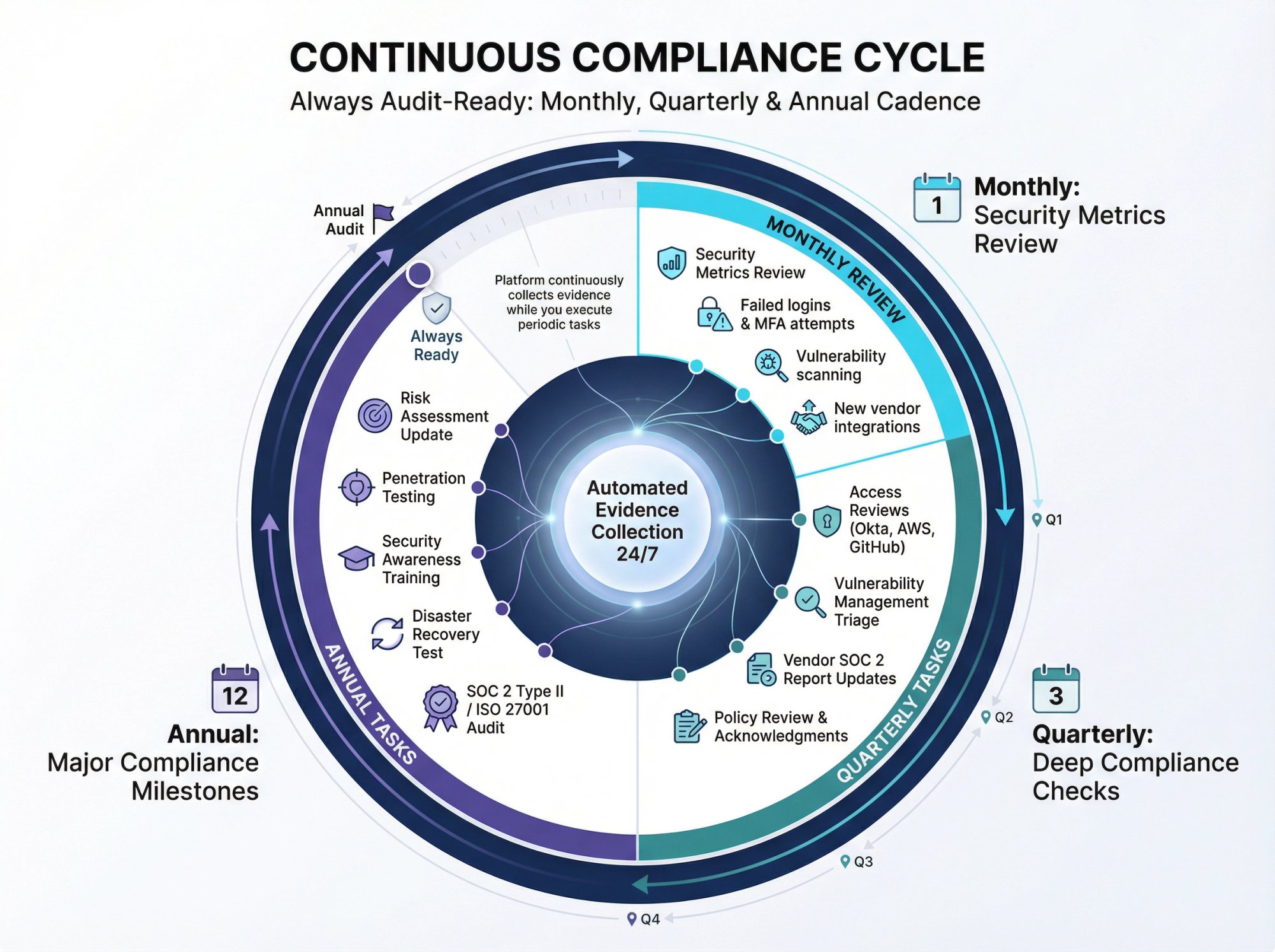
This cadence ensures you're always audit-ready. If a customer asks for your SOC 2 report tomorrow, you have fresh evidence and current controls.
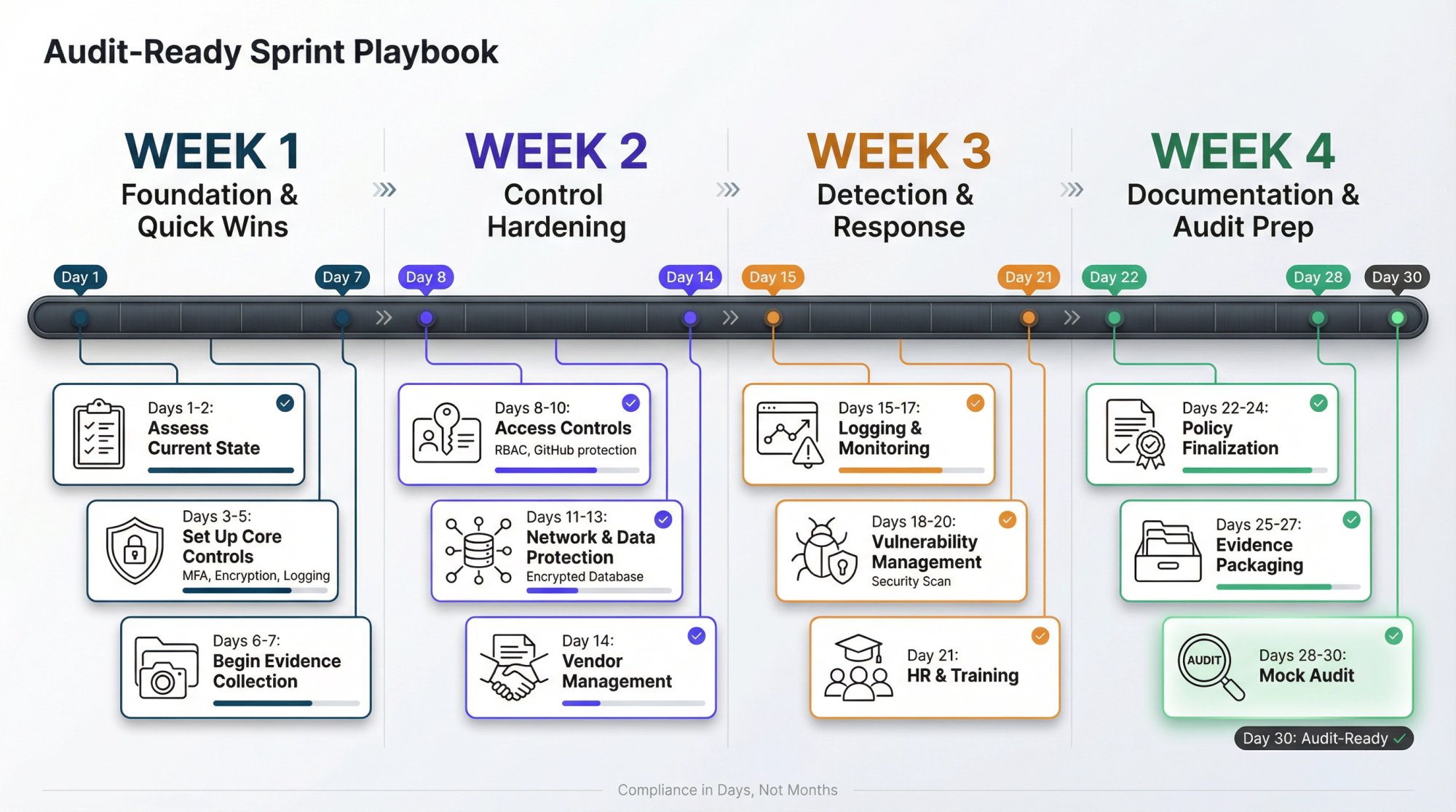
How to Get Audit-Ready in 30 Days (Sprint Playbook)
If you need to get compliant fast (enterprise deal closing in 30 days), here's the sprint plan.
Week 1: Foundation and Quick Wins
Day 1-2: Assess current state
- Document your cloud architecture (AWS accounts, VPCs, key services)
- List all SaaS tools and integrations
- Identify obvious gaps (no MFA, no logging, shared accounts)
Day 3-5: Set up foundational controls
- Enable MFA everywhere (Okta, AWS, GitHub, Google Workspace)
- Turn on CloudTrail organization trail in all regions
- Enable S3 and RDS encryption by default
- Set up basic security groups (default deny)
- Create a security policy document (can be simple, just needs to exist)
Day 6-7: Start evidence collection
- Take screenshots of MFA enforcement
- Export initial access lists
- Document current user accounts and roles
- Set up a folder structure for evidence (governance, access, network, etc.)
Week 2: Control Hardening
Day 8-10: Access controls
- Review and remove any shared accounts or unused credentials
- Set up RBAC in AWS (groups, roles, policies)
- Configure branch protection in GitHub
- Set up quarterly access review process (first review happens now)
Day 11-13: Network and data protection
- Diagram network topology
- Verify databases are in private subnets
- Enable encryption for all data stores
- Set up backup policies and run a test restore
- Configure CloudWatch alarms for critical events
Day 14: Vendor management
- Create vendor inventory spreadsheet
- Request SOC 2 reports from AWS, critical SaaS vendors
- Draft vendor assessment questionnaire template
- Add security requirements to your standard vendor contract
Week 3: Detection and Response
Day 15-17: Logging and monitoring
- Configure centralized logging (CloudWatch, S3, or SIEM)
- Set up security alerts (GuardDuty findings, failed logins, config changes)
- Create an incident response runbook (even a simple doc works)
- Define incident severity levels and escalation paths
Day 18-20: Vulnerability management
- Run infrastructure vulnerability scans
- Triage and create remediation tickets for high/critical findings
- Set up automated dependency scanning in CI/CD
- Schedule quarterly pentest (can happen after audit)
Day 21: HR and training
- Collect signed NDAs and background checks
- Deploy security awareness training to all employees
- Create acceptable use policy
- Document onboarding/offboarding access procedures
Week 4: Documentation and Audit Prep
Day 22-24: Policy finalization
- Finalize information security policy
- Create specific policies (access, encryption, incident response, acceptable use)
- Get executive sign-off
- Distribute to employees and collect acknowledgments
Day 25-27: Evidence packaging
- Organize all evidence by control area
- Fill gaps (missing screenshots, incomplete access reviews)
- Create a controls matrix mapping your controls to framework requirements
- Write narratives explaining how each control works
Day 28-30: Mock audit
- Review your evidence as if you're the auditor
- Test sample controls (can a test user bypass MFA? are terminated users still in systems?)
- Fix any failures immediately
- Schedule the actual audit
At the end of 30 days, you'll have functioning controls and organized evidence. This gets you to SOC 2 Type I readiness (controls designed and in place). For Type II, you need the controls to operate over 3-12 months, but you can start the clock immediately.
Best Compliance Automation Tools for Startups
Cloud compliance gets hard because:
- Evidence is scattered across AWS/Azure/GCP, your identity provider, Git, ticketing systems, MDM, and security scanners
- Engineers don't want to screenshot consoles for auditors
- Founders don't want a 6-month compliance grind
A modern compliance automation platform should reduce work in three ways:
1. Automate evidence collection across your stack (and keep it current)
2. Drive tasks to closure (owners, reminders, due dates)
3. Package evidence auditor-ready with clear mapping to framework requirements
With modern automation, small teams can achieve compliance in days instead of months. The platform handles evidence collection, control testing, and audit preparation while your team focuses on building products.
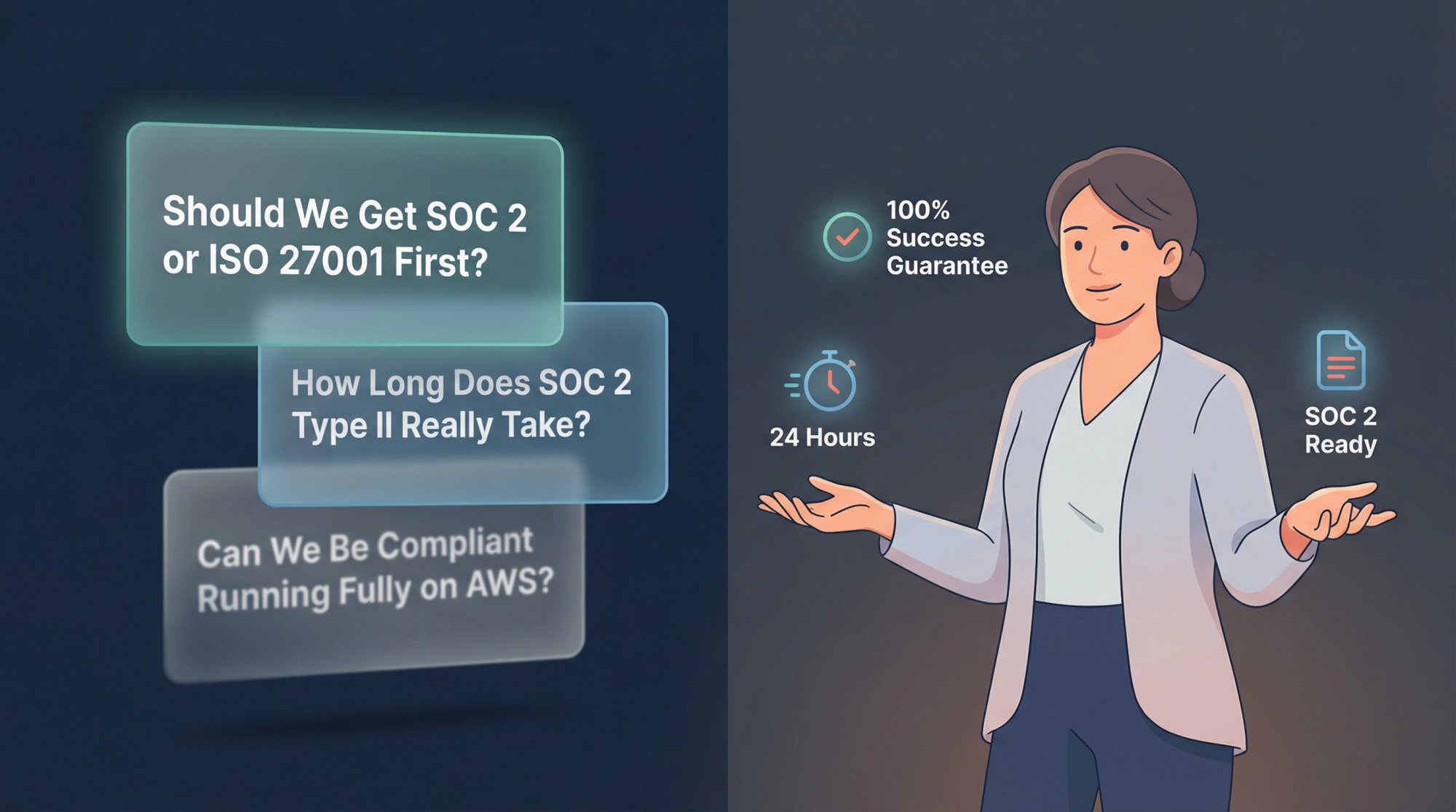
Cloud Security Compliance FAQs: Your Questions Answered
Cloud Security Compliance FAQs: Your Questions Answered
Should We Get SOC 2 or ISO 27001 First?
If you sell mostly to North American enterprises, SOC 2 is often the fastest path to prove security. If you sell internationally (or into EU-heavy procurement), ISO 27001 can carry more weight. Many SaaS companies eventually do both, but you should start with whichever your buyers ask for most often.
The practical answer: look at your sales pipeline. If 80% of enterprise deals are asking for SOC 2, get SOC 2 first. If you're targeting European markets or multinational enterprises, ISO 27001 opens more doors.
Can We Be Compliant Running Fully on AWS/Azure/GCP?
Yes, but cloud doesn't automatically make you compliant. The provider gives you capabilities (encryption, logging, network controls), but you must configure them, operate them correctly, and prove they're working.
The shared responsibility model means you still own:
- Identity and access management for your users
- Security group configurations and network design
- Data encryption settings
- Logging and monitoring setup
- Incident response and vulnerability management
Your cloud provider's SOC 2 or ISO 27001 certification covers their infrastructure. You need your own certification proving you configured and operated your environment securely.
What's Actually the Hardest Part of Cloud Compliance?
Not writing policies. The hardest part is operational evidence:
- Access reviews happening on schedule
- Vulnerability remediation tracked to closure
- Logs retained and monitored with real alerts
- Vendors reviewed annually
- Incidents handled with a documented process
This is where automation makes the difference. Manual evidence collection means someone has to remember to screenshot settings, export user lists, and organize files quarterly. Automated platforms continuously collect evidence and alert you when tasks are due.
How Long Does SOC 2 Type II Really Take?
SOC 2 Type II requires controls to operate over an observation period. Most auditors require 6 months minimum (some accept 3 months for early-stage startups). Understanding how long SOC 2 compliance takes helps you plan your timeline properly.
The timeline looks like this:
| Phase | Duration | Activity |
|---|---|---|
| Month 0 | Setup | Set up controls and start automated evidence collection |
| Months 1-6 | Observation | Controls operate continuously, evidence collected automatically |
| Month 6 | Audit | Fieldwork begins (auditor reviews evidence and tests controls) |
| Month 7 | Completion | Auditor issues report |
| Total | 7 months | From starting compliance work to having a report |
The key insight: with automation, you can be audit-ready on day one. The observation period still exists (you can't skip time), but you're not spending months manually collecting evidence. You're operating normally while the platform proves your controls work.
Should We Use the Cloud Security Alliance Cloud Controls Matrix?
If you want a cloud-native control baseline that maps to multiple frameworks, CSA CCM is a strong option. The CCM provides a structured set of cloud security controls organized by domain (application security, data security, infrastructure security, etc.).
The advantage: CCM is designed specifically for cloud environments and maps cleanly to SOC 2, ISO 27001, and other frameworks. If you use CCM controls, you're likely 80%+ covered for any framework a customer requests.
The downside: CCM is comprehensive (197 controls in version 4.0), which can feel overwhelming for small teams. Most startups don't need every CCM control. Focus on the baseline that satisfies your target framework.
What If We Don't Have Time or Resources for Compliance Right Now?
You have options:
Option 1: Start with foundational controls
Even without a full audit, setting up MFA, encryption, logging, and access controls significantly improves your security posture. When customers send questionnaires, you can answer "yes" to basic security questions even if you don't have a SOC 2 report yet.
Option 2: Use a compliance platform to accelerate
Platforms reduce the work required dramatically. Instead of 6 months of manual effort, you can be audit-ready in weeks.
Option 3: Pursue SOC 2 Type I first
Type I proves your controls are designed correctly without requiring months of observation. This can unblock some deals while you work toward Type II.
Option 4: Self-attest for now
Some customers accept a detailed security questionnaire or self-assessment if you're transparent about your compliance timeline. Be honest: "We're setting up SOC 2 controls and plan to complete our Type II audit by Q3 2026."
Do We Need Separate Compliance for Each Cloud Provider in Multi-Cloud?
No, but you need to prove controls work consistently across all cloud environments. If you use AWS for compute, Azure for data analytics, and GCP for machine learning, your access controls, encryption, logging, and monitoring must function the same way in each environment.
The practical approach:
→ Use centralized identity (Okta, Azure AD) with SSO to all cloud consoles
→ Set up the same security baseline in each cloud (IaC helps here)
→ Aggregate logs from all clouds into one SIEM or analysis tool
→ Document your multi-cloud architecture and control setup
Your SOC 2 or ISO 27001 report covers your entire tech stack, regardless of how many cloud providers you use. Just ensure your evidence shows controls operating everywhere.
Get Compliant Fast: Your Next Steps
If you're a B2B SaaS company under 100 employees, cloud security compliance is absolutely achievable without turning your engineers into evidence clerks or your founders into part-time auditors.
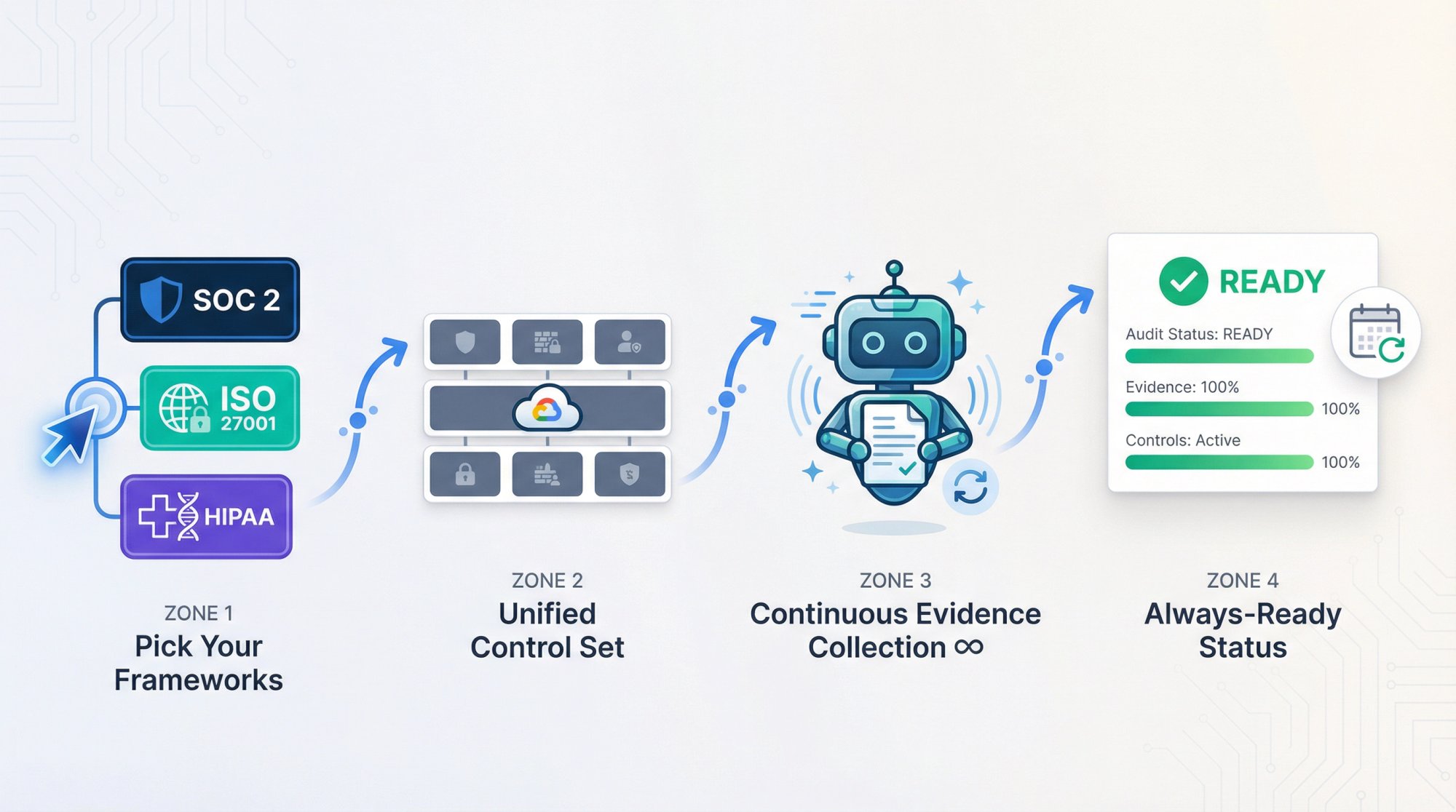
The winning approach:
→ Pick the frameworks your market demands (SOC 2 for North America, ISO 27001 for international)
→ Set up one cloud-native control baseline that satisfies multiple frameworks
→ Automate evidence collection so it's continuous, not a quarterly fire drill
→ Run a lightweight cadence that keeps you always ready
Compliance isn't just a checkbox for enterprise deals. It's operational discipline that protects your business, builds customer trust, and scales with your company.
If you're ready to get started, the best time is now. The controls you set up today start the clock on your observation period and unblock enterprise revenue tomorrow.